AI for Job Hunting: Build Your Own System
Contents
1. AI for job hunting: build your own system
AI for job hunting
- Explore Search Desk.
- Practise an interview.
- Add one useful feature.
- Share what you did.
- Take your version home.
Tonight we're going to explore a small app called Search Desk to keep track of a job search. I vibe-coded this app as an example of something you could build for yourself, but it's actually designed so that you can easily add new features to it. It is also designed for any web browser in a single file, so data stays on the device and is easy to export and import. You can work with it using AI and software installed on your computer, but you can also use it on your phone with free web accounts by pasting in prompts.
The point of Search Desk is to show you what a well-designed vibe-coded app looks like, especially one with odd constraints like being usable and modifiable by free web-based AI.
First we'll explore some of the basic features, add a job posting, practise an interview, and then ask an AI to change the app itself. You don't need to know how to program.
We'll spend most of our time in two windows: your agent, where we talk with the AI, and your browser, where we use the app. I'll show each step before you try it. Before we leave, we'll save what you've made and look at a way to use the desk with a free web chat at home.
2. AI, agents, and the harness
Terms
There are a few common terms to get familiar with:
- Model
- LLM
- Chatbot
- Agent
- Prompt
- Vibe-coding
A model is the AI itself, the equivalent of the brain. It only ever takes text in and writes text out.
An LLM is a large language model: a model trained on a huge amount of writing.
A chatbot is a computer program you chat with by typing, or by speaking. ChatGPT, Gemini and Claude are chatbots.
An agent is an LLM with software around it that lets it act. A chatbot waits for you. An agent can act.
A prompt is what you type, or say, to start it off. Usually this refers to the initial set of instructions given to the model.
Vibe-coding is using AI to create software for you. You tell it what you want and it writes the code. You don't need to know anything about coding, but it does help. It's even more helpful to know as much as possible about the problem you're trying to solve.
Agents
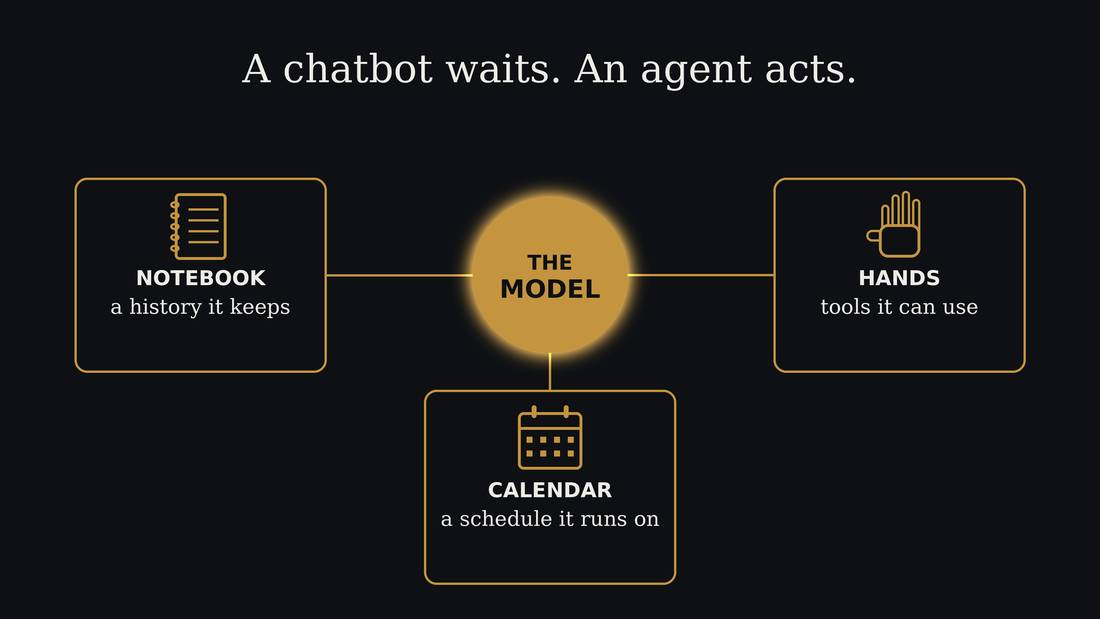
The AI we're using today is the agentic kind, an AI agent. This is what software developers use to write code, and what is being put into the new AI assistant products.
Agents are the AI model combined with regular software that lets it act. The AI model only ever writes text. That's all it can do. It can't click anything, it can't open a file, and it can't send anything. But a program is wrapped around it, the harness, and that program reads what the model writes and acts on it. So when the model writes "send this email to Sam", it's the program around it that really sends it. The AI plus that program is what people call an agent.
The model starts fresh every time. So the program also keeps a notebook for it: files of notes and instructions that it reads at the start.
A model is frozen in time
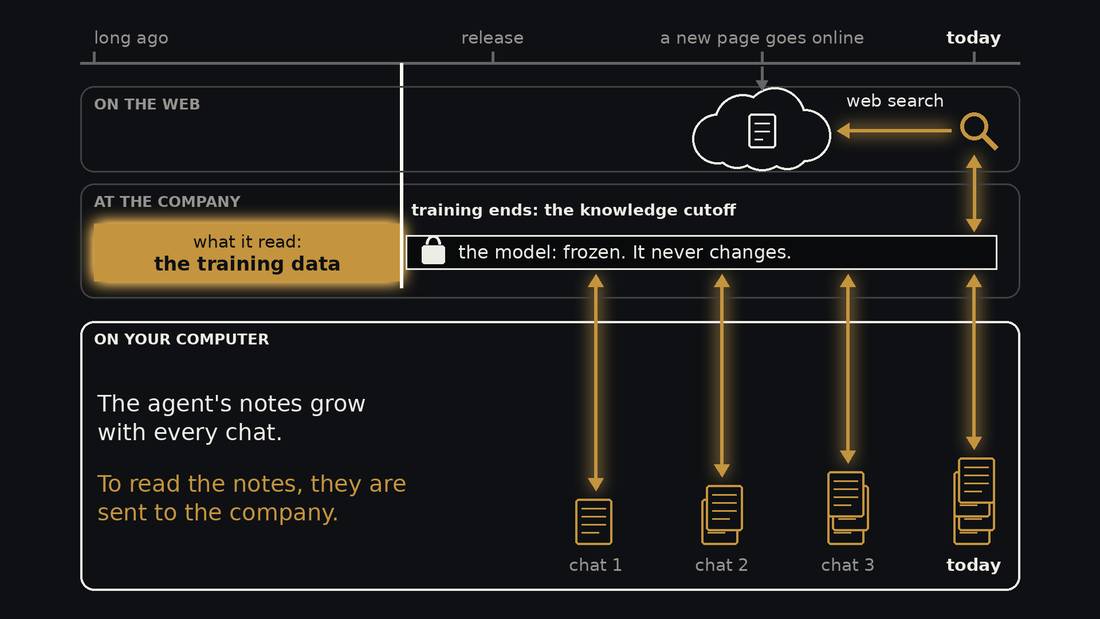
A model is made by training. The company collects a huge pile of writing, the training data, and the model practises on it for months. That is the only time it learns. When training ends, the model is frozen, like a book that has been printed. That day is called its knowledge cutoff. The model never changes again, and it knows nothing that happened after that day.
What does change is your agent's notes. In every chat the agent can write things down, in files on your computer. The notes pile up over time. The model stays the same.
The notes and the model are in two different places. The notes are on your computer. The model lives at the company. So every time the agent reads your notes, they are sent to the company. What it writes comes back and is saved in your files.
The web is a third place. New pages go online every day, long after the model's cutoff, and the model has never read them. A web search is how it gets them. The search brings back a page, and the model reads it.
The context window
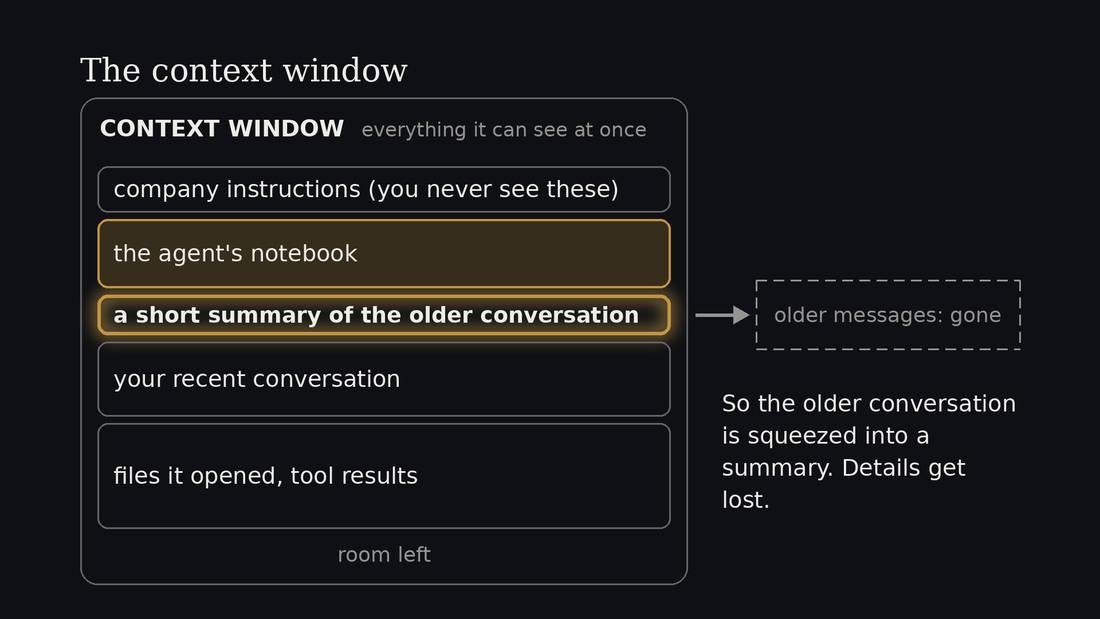
Everything the model can see at once is called its context window. Think of it as one page. It's the model's short-term memory. The page holds the company's instructions, the agent's notebook, your conversation, and every file it opens.
The page has a size limit. So the notebook competes for space with your conversation. A long notebook leaves less room to work.
When the page fills up, the older conversation is squeezed into a short summary, called compaction, and details get lost. That's why a long chat starts to forget things, and why it helps to start a new chat for a new job.
How Search Desk was made
- It's an early prototype. Things may break.
- I chatted with an AI about what a job seeker needs.
- Then a plan, a design, and a list of small tasks.
- A second AI reviewed the design before anything was built.
- Subagents built one task each, checks proved each one.
- Riskiest code was independently reviewed.
Search Desk is an early prototype, built in a weekend so it will have rough edges. Tell me what breaks, because that's useful. It's a good example of how to build something bigger than a single chat can hold.
I got inspired by talking to a few people during the one-on-one consults. Then I had a conversation with the AI about it. We brainstormed and did research about what a person looking for work actually needs, what's already available and what the free web chats can and can't do. From that we wrote a design: what the app is, what it must never do, and the rules every feature follows. Then a second AI reviewed the design and found problems, before there was any code to fix.
Next came a work plan: a numbered list of small tasks, each with a check that says when it's done. Then I used one AI as the manager. It handed tasks to helper agents, several at a time, each told which files were theirs. Each helper wrote its piece and its checks, then the manager had another AI review the most complicated code and finally the manager ran everything together before saving it. Each feature has many automated tests. Nearly 400 automatic checks when this version was complete. Tests are what help the AI not break things that are already working, and if you write your new tests first before writing the code, then you know when the code is working.
These are pretty standard practices in software engineering, with agents this is sometimes called orchestration, and the AI coders are learning to do this without you even asking but I like to ensure they follow best practices.
You'll do a small version of the same thing tonight: say what you want, make a plan, build one piece, and check it.
Use the made-up person
- Everyone works with Amira and the sample jobs.
- Keep your own name, resume and accounts out of the exercises.
- Ask for help if you get stuck.
We're all going to work with Amira, a made-up person whose details are already in the sample desk. The jobs are made up too. That gives us something to work on without sharing anyone's own resume, work history or accounts.
Amira has experience doing accounts-payable work, which means keeping track of money a business owes and helping make sure bills get paid. She's looking for work in Toronto. We'll learn more about her when we practise the interview.
3. A desk for the whole search
What needs keeping track of?
- A job worth considering.
- An application and its next step.
- An interview to prepare for.
- A person or event that could help.
Tracking all the various aspects of a job search is time-consuming and painful. You can get a chatbot to help with resumes and cover letters but helping with the workflow itself requires additional software. Search Desk is a prototype of what that might look like, but more importantly it's built to be changed easily, so you can customize your own personal workflow so that it works best for you.
Meet Search Desk
- See Amira's sample jobs and application stages.
- Find the next action and its date.
- Find a local event or human service worth considering.
- Keep a record you can return to.
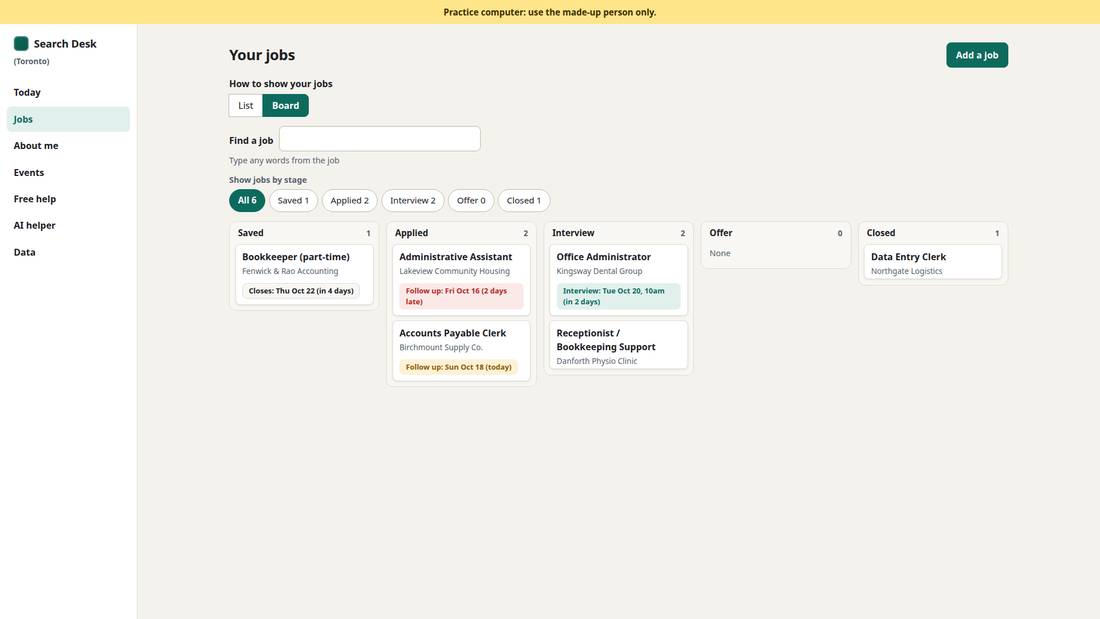
Let's look at our fictional person Amira's job search desk. These are her sample jobs. Each record gives her somewhere to keep the posting and see where she is in the process. When she comes back tomorrow, she can find the next action without reading a whole chat again.
I'll open the Kingsway Dental Group job. This is the one we'll use for interview practice. Notice the job details, the stage of the application, and the next thing Amira needs to do. We'll also look at a place to keep an event or a useful human service.
Start with free human help
- Employment Ontario and the library's career services.
- 211 and library settlement workers for help finding the right service.
- Some programs have eligibility rules; ask the service.
- Today's tool helps organise the work between those conversations.
It's important to note there are real people who can help with finding a job. Employment Ontario and the library have career services. The library also has sessions about resumes and interviews. A settlement worker or 211 can help you find a service that fits your situation. Some programs have rules about who can use them, so ask the service directly. Search Desk lists local events and free services in a sample list, so it helps you spot some of them. It doesn't have everything, so check with the library too.
A person can help you think through a choice, understand a local workplace, or find support you didn't know existed. We're making a place to keep track of that work, including what you want to ask at your next conversation.
Desk is not an AI
- The desk keeps records and shows what is next.
- The AI can read, suggest and help you practise.
- You choose what to keep and what to do.
- The desk remains useful when the AI is unavailable.
The desk keeps records. The AI helps us work with them. We can ask it to read a posting, suggest a next step, or play an interviewer. We decide whether its suggestion belongs in the desk.
This is useful because a chat can be a very messy place to keep a long project. You might have a good conversation and then struggle to find the one date you need. The desk gives those details a home, and you can keep using it when the AI is busy or you've reached a usage limit.
Add a posting with your agent
Add the job posting
Let's test out the most basic job search process - tracking a posting. For the workshop, as always we use synthetic data.
We're using an agent to interact with Search Desk, whoch was designed specifically to make it easy for agents to read your desk, what jobs are already there, and write to it, to add jobs.
Ask it to add this posting for Amira. When you do this normally you would paste in a url for the agent to look at or if bots aren't allowed at that url you give the url and paste the text from the page. For this demo I've created a fake job posting page that you can look at in the browser.
It should automatically reload the desk and you can check out the new posting. Compare the record with the posting. Did it get the employer right? Did it keep the requirements? The posting doesn't give a pay rate or a closing date, so those should stay unknown.
Search Desk
- Today: what needs doing, and what is late.
- Jobs: every job and its stage, as a list or a board.
- About me: the short profile the AI recipes use.
Let's look around the rest of the desk. Today is the first screen. It shows what needs doing and what is late, worked out each time the page opens. Nothing watches for you while it's closed.
Jobs holds every job and its stage, from saved to applied to interview. Open one and you see the dates, the next step and the posting itself. About me is a short profile. The AI recipes read it, so they know who they're helping.
Search Desk
- Events: library and city events, and a star for the ones you want.
- Free help: people and services that cost nothing.
Events lists library and city events. A star keeps the ones you want. Free help lists people and services that cost nothing. And your data is yours: you can export a copy, bring one back, and undo a change. The data comes from another vibe-coded project of mine called Togather. It's events for agents. It scrapes event data for Toronto and makes it available for free to your AI agent, who can then curate that data to give you good recommendations. It can be very hard for an agent to access and find event data, many sites block scrapers and if you rely on Google then you run into the same problem as always - small local events don't show up in the search.
Search Desk
- Your data: export a copy, bring one back, undo a change.
- AI recipes: Mode B, copy and paste. Agent route: Mode A, files.
The AI can work with the desk in two ways, and you'll see both today. Mode B is copy and paste. The desk writes a recipe, you take it to any chat, and you bring the answer back to check. Mode A is an agent with access to the files, which is what we're about to use. It reads a copy of your records, kept in a file, and prepares changes for the desk. Either way, you decide what to keep.
4. Practise one interview
Test interview as Amira
- Click the
+Newchat button
I want to practise the Kingsway job
- To skip a question:
skip
- Open Amira's background beside the sample posting.
- Answer as Amira for a few minutes, then type:
interview over
Let's try a short interview. Click the New chat button in the top left to start a fresh Code conversation in the workshop folder and ask the agent to interview you for the Kingsway job.
For the next few minutes, answer as Amira. You can type your answers. Her background is short, so you can invent whatever you like, have fun. If you don't want to role-play or answer a question just say "skip".
There's already something worth noticing in this posting. The office wants weekday hours, with some evenings, while Amira's profile gives evening and weekend availability. That needs a question, not a guess.
When you type "interview over", the recipe switches from interviewer to coach. It gives feedback on the answers you gave, and only those. Read it. Does each point quote something Amira said? Did it say anything about a question you skipped, and was that fair?
As you answer, notice the interviewer too. Does it let you finish? Does its next question follow from what you said? When you're done we'll look at how well the recipe worked.
Review interviewer, improve recipe
Review interview
- Give the AI the interview transcript and the recipe that produced it.
- Ask where the interviewer went wrong, with examples from the transcript.
- Ask for one small recipe change to address an issue.
- Try the revised recipe and compare what happens.
Let's ask for a review. This sort of workflow improvement cycle is really important in vibe-coding. You should always have the AI reviewing everything and making suggestions on what to improve.
Let's read one of its suggestions. Does the transcript support it? Is it blaming the interviewer for something the transcript doesn't show? We need to check the review too.
Normally you could accept the changes and try the interview again and see if those changes helped.
Automated testing
/test-interview
You can automate some of that testing too. Search Desk has a test for this. It's a program that runs a test for us, in this case giving the interviewer a practice candidate to talk with. The AI plays both parts, passing messages back and forth. We can run the old and changed recipes with the same background and compare the transcripts. One good conversation is useful evidence, but we'd need more tests before saying the problem was solved.
This time we'll directly use an agent command, or what is called a skill in some coding harnesses. Commands and skills are sets of instructions that are pre-created. This one is made specifically for the workshop, but there are other interviewer testing tools that are part of the search desk code.
It takes a few minutes, so start it now and we'll read the results when it finishes.
5. Make the desk work differently
Vibe-code a feature
- return to your original chat
Design a new feature
- Explore the current app.
- Describe something that would help Amira.
- Walk through it: what does she open, do and see?
- No idea yet? Ask the agent for a suggestion.
- Read its short plan and agree before building.
Build it and check it
We've changed instructions for the interviewer. Now we're going to change the desk itself.
This is often called vibe coding: you describe what you want in ordinary words, and an AI writes the program code. Today the agent has instructions to help you choose a small feature, make a plan, and check the result with you.
Go back to your original conversation with the agent instead of carrying on with the interviewer. Tell it you'd like to build a feature to Search Desk.
Think about one task Amira needs to do. Feel free to look through Search Desk and see if anything is missing or broken, to discover what you think should be added. You can also ask for suggestions, there are many features you can add that are already planned but not created yet.
Describe what she opens, what she does, and what she should see afterwards. That little walkthrough gives us something to check. If you have no idea yet, ask the agent to suggest one.
Read its plan before agreeing. Keep it to one change you can see and try today. If the plan sounds too big or you can't tell what it will do, ask for a smaller, clearer version.
Build, check, try, change
- Let the agent build the agreed feature.
- Ask for a separate review, fixes and feature checks.
- Reload the page (Command-R on a Mac, F5 elsewhere) if autoreload doesn't work.
- Try the feature yourself.
- Describe one thing to improve.
Once you agree on a plan, let the agent build it. It should run checks and ask for a separate review of the change. You can ask it what a check tested, in plain words.
When it's ready, check in the browser. It should reload automatically; if it doesn't, reload the page. Walk through the task you described. Watch what the app actually does. A message saying the checks passed is useful, and now we need to see whether Amira could use it.
If something goes wrong, tell the agent what you did, what you expected, and what happened. That gives it more to work with than “it's broken.” If it keeps failing, ask for help getting back to a working version.
Two review loops
- Review the change: ask a subagent to look for problems.
Use a subagent to review the changes.
- Fix what it finds, then run the checks again.
- Review the process: how to avoid problems next time?
How can we avoid these problems next time?
- Try the result yourself: does it help Amira do the task?
While some of the agents are working, there's another useful thing we can borrow from the interview test. We can review both what was made and the instructions used to make it.
First, ask a separate subagent reviewer to read the change and compare it with the plan. A subagent is controlled by the main agent but gets its own conversation to inspect the work. It may spot something the builder missed, though it can miss things too. The builder can fix the problems and run the checks again.
Then, if the same kind of mistake keeps happening, ask what instruction would help next time. Perhaps the agent keeps forgetting to check what happens after a reload. We could add that to the project's instructions.
You may see a file called AGENTS.md, which holds instructions for working in this project. A file called SKILL.md holds instructions for a particular task. You don't need to learn either format today. Ask the agent to show you the proposed instruction and where it would save it. Read it before agreeing, just as we read the change to the interviewer recipe.
Try the awkward case
- An empty field.
- A second click.
- A reload.
- A job with different details.
- Did the new feature help with the original task?
- What still needs fixing?
If your feature works once, try it a slightly different way. Leave a field empty. Click the button twice. Reload the page. Use a job with different details.
Choose a test that fits what you built. If your feature saves something, check that it's still there after a reload. If it adds something, check whether a second click adds it twice.
Then return to the task you started with. Does this help Amira do it? If you have time left, improve that feature and try again.
6. Share and keep it
Two ways to work with AI
- Mode B · Copy and paste: take a recipe to a chat; bring its answer back to check.
- Mode A · An agent with files: let an agent read a copy of your records and prepare changes for the desk.
- The recipes are plain text. Use a chat service you prefer.
- The desk works without AI, too.
Before we save and leave, let's look at how this can work at home. Search Desk has two ways to work with AI. The names are Mode A and Mode B.
Today we used Mode A, an agent with access to the project files. Here the desk kept a copy of its records in a file, so the agent could read them. At home, you can export a copy yourself. Then the agent prepares changes for the desk. We still reload, inspect the changes, and decide what to keep.
Mode B uses copying and pasting. You take a recipe from the desk to a web chat, give it the information it needs, and bring the answer back to check. Let me show you one short round trip with our sample posting.
The recipes are plain text, so you can use a chat service you prefer. For the agent route, you need a tool that has the right file access. The program around an AI that supplies its tools and permissions is called a harness. Claude Desktop is the one we're using today; another compatible agent can follow the same project instructions.
When you change tools, check the result again. Services differ in what they can do and how well they follow a recipe. And you can keep records in the desk without using AI at all.
Use it at home
- On your phone: open the link. Use free AI chat for Mode B.
- On a computer: Mode B works too. OpenCode for Mode A.
- Your records stay in that browser, on that device.
- Keep your name and phone number out of it.
Search Desk is on the web, so you can open it tonight. On your phone, you can keep your jobs and use Mode B with whatever free chat app you already have. You don't get a customized version, it's more like a regular website. Making changes to the app or building new features requires an AI coding harness on a computer.
Your records stay in the browser on the device you used. A phone and a computer don't sync. To move your desk, export it on one and import it on the other.
Which free AI chat?
- One you already use: ChatGPT, Claude or Gemini.
- Differ in search, files, voice and how much you can use.
- Not an agent that can edit your folder.
- Hit a limit? Save, wait, or switch model/company.
If you already use ChatGPT, Claude or Gemini, start by trying the recipe there. Free plans differ in whether you can search the web, attach files or use voice, and how much you can do before you reach a limit. Those details change, so check the service's current help page when you need a particular feature.
A free web chat also doesn't automatically give you the file-editing agent we've used tonight. Copying and pasting is the route we're showing for that situation.
If you reach a limit, save your work. You can wait for the allowance to return, or take the recipe and the needed information to another chat. If it can't search, give it the posting and ask it to say what it hasn't checked.
OpenCode
- Open-source, originally for building software
- A desktop app, web page or a terminal program
- Works with any AI, and comes with free ones
- Type
/modelsto pick an AI that is labelled "Free" - Or pay: OpenCode Go starts at $10 USD/month
OpenCode is an open-source agent made for building software, except that you choose the AI. It comes as a desktop app for Windows, Mac and Linux, as a program you run in the terminal.
Download the desktop app from opencode.ai/download. To choose the AI, type slash models. Most of the free ones have the word Free in their name, and they work without an account. The cheapest paid plan, OpenCode Go, starts at ten US dollars a month, which is more in Canadian, and the free models are enough to start. To use an AI you already pay for, type slash connect.
Two kinds of free AI
- Always free: open models, like NVIDIA's Nemotron. Slower, and not as good.
- Free while in testing: the company wants to see how you use it. Some are secret models with code names, before launch, and often as good as the best paid ones.
- Each model has a note on what happens to what you type. Read it first.
These agent apps come with free AI, and it comes in two kinds. Some models are always free, often open models, like NVIDIA's Nemotron. They'll still be there next month, but they're slower and not as clever.
The other kind is free because it's being tested. The company wants to see how people use it, so what you type is the payment. Some of these are secret models with code names, put out before their official launch, and they can be as good as the best paid ones. So the best free AI is often the one that's using your data.
The list changes every few weeks. Each model in it has a note saying what happens to what you type. Read it before you paste in anything personal.
Choose one next step
- Book a conversation with a human career service.
- Try the desk at home with information you choose to share.
- Keep improving one part of the system.
We've used a desk, tried an interview, and changed a piece of software by describing what we wanted. In each case we had something we could look at and check: a posting, a conversation, or a feature we could try.
Choose one next step that fits your own search. You might book a conversation with a career service, try keeping a few records in the desk, or improve the feature you started tonight. Choose what information you're comfortable sharing with an AI, and read what it produces before you use it in an application.
Thank you for spending the evening with me. If you have a question about your version, come find me before you go.