Get Things Done with AI: Build Your Own Productivity System
Contents
1. Get things done with AI
- A weekly review practice, since 2009
- Meet Dana, a made-up person with a busy fall
- Ask an AI for help when you are stuck
- Run a weekly review that celebrates, asks why, and plans
- Plan a week that fits the hours you really have
Tonight is about Getting Things Done. It shares a name and some ideas with a personal productivity system developed by David Allen and published in a book of the same name in 2001.1 I'm going to tell you about my own practice I've kept since 2009: the weekly review. Once a week you look at last week's list. You see what got done, you ask why the rest didn't, and you write next week's list. For years I did this every week with a slowly changing group of brave souls. These days three of us meet once a month, and in between I do the review with an AI. And that's what this workshop is really about - it is now possible and quite easy to build your own system to help you get things done with an AI.
Here's the plan. First, what an AI is and what an agent is. Then why a weekly review is worth doing. Then most of the evening is you, at the computer, working with an AI on the week of a made-up person called Dana. Then you'll change how the AI talks to her and plan her next week, and then you'll write a few lines about your own week, on paper. We'll finish with an app that can keep the list for you, and how an AI can work with it.
Sources: 1
2. What is AI
It stops learning
- Training (learning) is over before you start.
- Your chat does not change it.
- "Memory" means notes it wrote about you.
The AI you are talking to is not learning from you. All of its training happens before you meet it. When training ends, the billions of numbers inside it are fixed. They are frozen, like a book that has been printed. Your conversation doesn't edit the book.
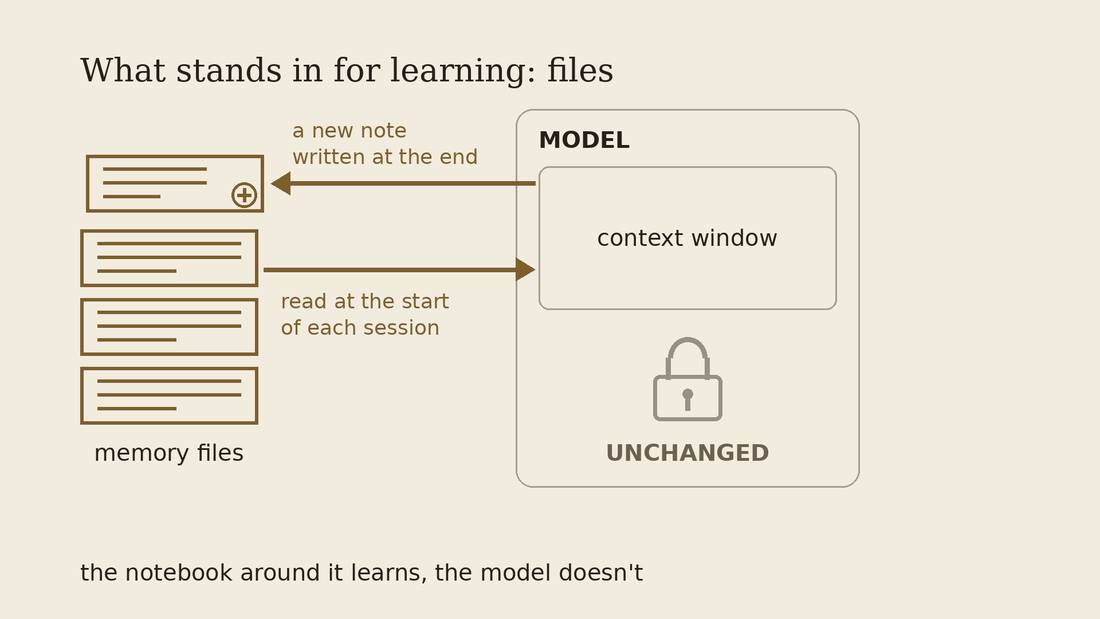
So the AI you talk to tomorrow is the same one you talked to today. Some products now say they "remember" you, but those are notes about you that it writes itself and then reads back at the start of every conversation.
Context windows
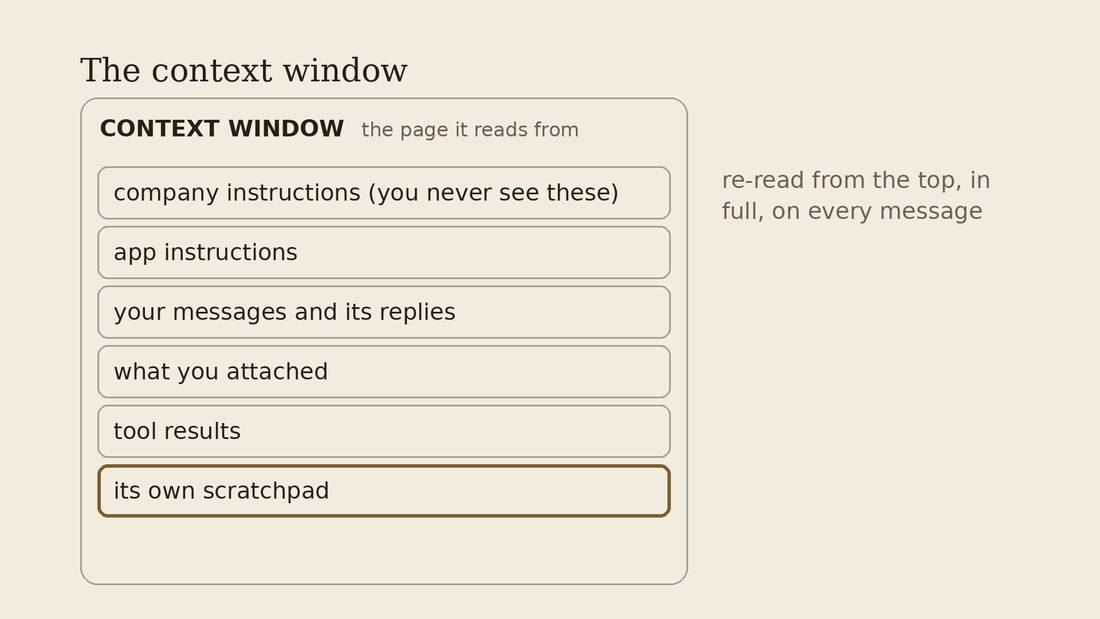
Everything the AI pays attention to before it writes its answer lives in its context window. It's the total amount of text it can hold in mind at once. Think of it as one page. Nothing off the page exists for it.
Every part of the conversation goes into the context window: the notes it has about you, the conversation so far, and its own thinking. When the page fills up, something gets dropped, or squeezed into a short summary, and details get lost.
So when you meet any AI helper, a good question to ask is: what does it read before it answers me? Every memory and instruction takes up space that could be used for its own thinking out loud and the rest of the conversation.
And the really strange part is that the AI reads its entire context window every message.
Agents
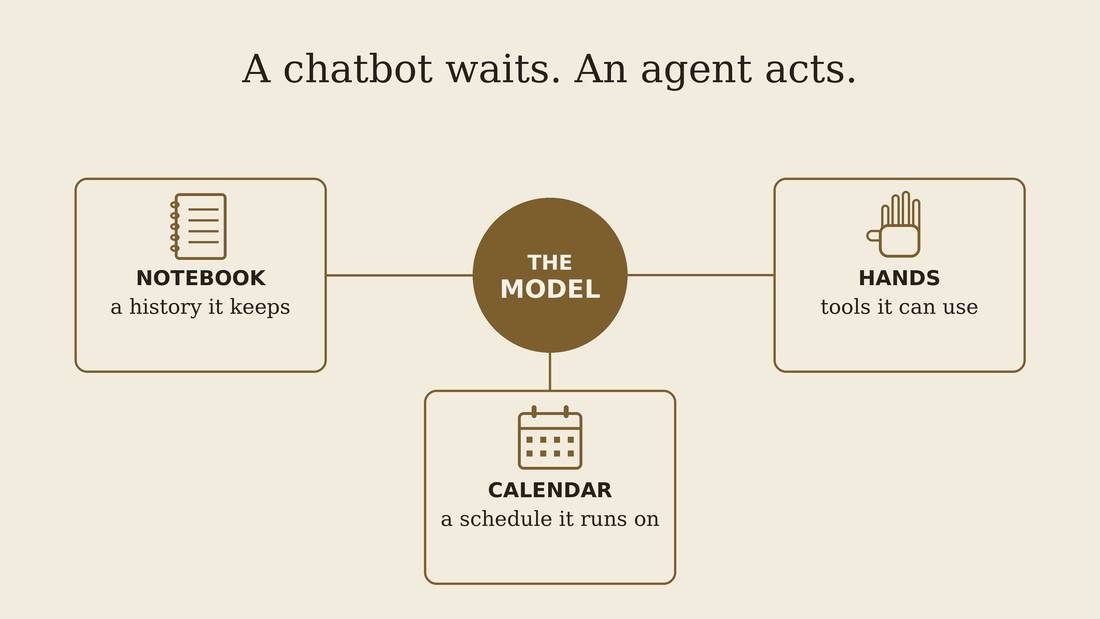
The AI model only ever writes text. That's all it can do. It can't click anything, it can't open a file, and it can't send anything. But a program is wrapped around it, and that program reads what the model writes and acts on it. So when the model writes "send this email to Sam", it's the program around it that really sends it. The AI plus that program is what people call an agent.
An agent keeps its memory in files: its instructions on how to do GTD reviews, a log of what happened, and your to-do list.
For an agent to help with your to-do list, it needs three things. It needs notes on how to work with you. It needs tools to read your list and change it. And it needs a clock, so it can check in with you when it's time, the way a friend might text on Sunday night.
A weekly review is a loop too: read the list, check what really happened, write the next list. That's why an agent suits it.
3. Why a weekly review
What a review is for
- The simplest thing: a list on paper, or in a Google Doc
- Someone goes through last week's list with you
- Count what you did. Celebrate it.
- Ask what got in the way of the rest.
- Change the list or the habit so next week can work.
- Size next week to the hours you have. Break big things into pieces that fit.
- Always something fun, and something healthy
Over the years the GSD club tried a lot of systems. We kept coming back to the simplest one: a piece of paper, or a Google Doc, with lists on it. Each week, someone goes through your list from last week with you. They ask what got done, and why the rest didn't. Then you write next week's list together.
So a review has four jobs. First, count what you did, and celebrate it. Second, ask what got in the way of the rest. Third, change the list or the habit, so next week can work. And fourth, size next week to the hours you really have, and break big things into pieces that fit.
We added some spice that worked for us: a list always has something fun on it, and something health related.
People found a weekly review helpful for different reasons, but two of the biggest were accountability, and setting aside time to think and plan.
Now that I have an AI helping with the weekly review and humans only monthly I missed my weekly check-in for the first time in 15 years. When I get busy I feel like I don't have time to plan, so involving humans or making your AI very insistent is likely necessary.
Where the AI helps
- It's there at 9pm on a Tuesday, when you're procrastinating
- It can read the whole record at once
- It can ask the same hard question every week, without getting tired of you
- A log of what you really did makes it more useful each week
A friend usually isn't free at nine on a Tuesday night, when you're staring at your list and can't start. An AI is. It can read every list you've written and every note at once. And it can ask you the same hard question every week without getting tired of you.
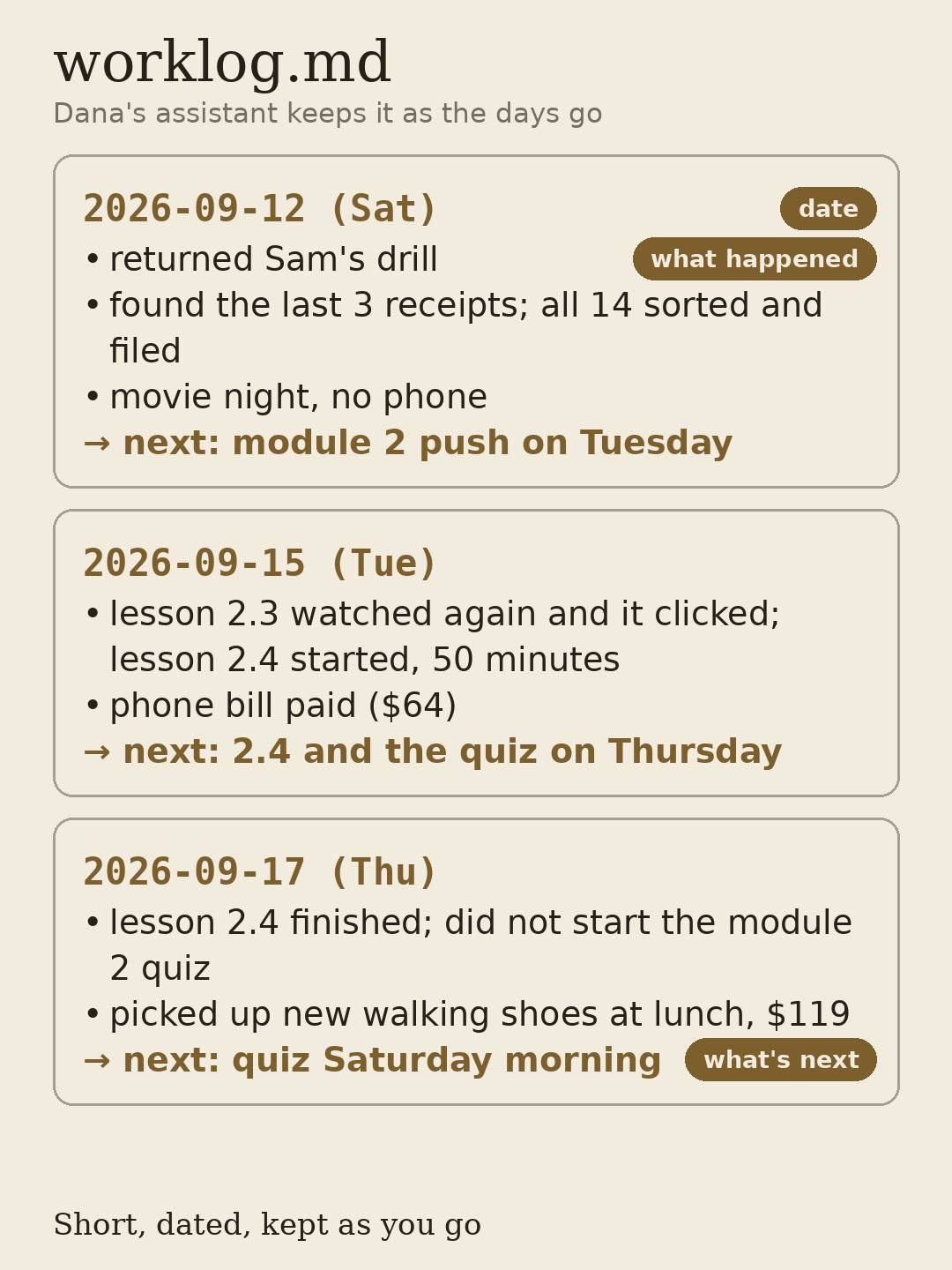
When you start to heavily use AI to get things done I have found that an agent written log file is very useful: a short, dated note of what you and the agent actually did together, kept as you go. The agent writes it. I find this useful because often we do a lot more than what is on my task list, and it's good to know what you accomplished and what distracted you from doing the things you should have done.
Dana's folder has one too. Each day has a date, a few short lines about what happened, and a line saying what's next.
There's research behind this. People who keep count of what they actually did follow through a bit more, and more again when they write it down and tell someone.2
Sources: 2
4. Work with Dana
Dana Whitfield
- Dana Whitfield works part time at a bike shop and takes a bookkeeping course
- Her folder is already on this computer: goals, eight weeks of lists, a work log
- Keep your own details out.
Dana Whitfield is made up. She works part time at a bike shop, and she's taking a bookkeeping course online in the evenings. Her folder has her goals, eight weeks of to-do lists, and a work log her assistant kept day by day. She did her review every Monday. The week of October 19 ended on Sunday, and her log says "weekly review Monday." It's Wednesday now, and it hasn't happened yet. She's been putting a few things off, so first she asks for a little help. Then we do her review.
Everything in her folder is invented, so you can't hurt anyone by reading it.
"I'm stuck"
- Type:
I keep putting off the dentist.
- Create a reason you don't want to phone the dentist.
Let's start small, before we do a weekly review let's ask for some help getting things done.
Its instructions tell it to do one of a few things with a stuck item. It can help you let it go for now. It can break it into something smaller. Or it can get you to pick one tiny step and say when you'll do it. That's what a good friend does in a review too.
How does it know what to do?
- AI skill: a plain text file of instructions
- Two jobs: get unstuck (short) and the weekly review (long)
- Automated testing: AI reviewer, AI Dana
- Diversity: cooperative, terse, defensive, unsure, argues back
- Meta-review: Review the reviewer skill
The AI helping Dana isn't making it up as it goes. It follows a skill. A skill is a plain text file of instructions that the AI reads when it starts a job. You can open it and read it, and you can change it. This one has two jobs. The short one is what you just did: ask one question, then help you pick one small step. The long one is the weekly review: count what got done, ask why the rest didn't, say what to change, and fit next week to the hours. The AI picks the job from what you say.
Before tonight my agent and I tested the review part, using only AI. One AI played the reviewer. Another AI played Dana. We gave Dana moods: easy to talk to, one-word answers, defensive, unsure, and one who argues back. The short job ran all five, and the weekly review ran three of them. Then we read the conversations and checked the plans. Did the quotes exist in her files? Did the hours add up? We fixed what broke, and ran them again.
That's not the same as a real person, but it's a good way to do a first pass on testing that the skill can handle the basics. Every time you do a weekly task review, you can do a meta-review: how could the reviewer skill be improved given your interaction?
Dana's review
Let's do our weekly review.
- Check ONE thing it said. Find it in the files yourself.
- Did it find something she did but never ticked?
- Did it spot a pattern across the weeks?
Now the real thing. Start a new chat and ask it to do Dana's weekly review for the week of October 19. It reads her lists and her log before it says anything, so give it a minute. Then it talks with you, one question at a time, and at the end it writes a file called review.md.
Your job is to check it. Pick one thing it told you, like a date, a win, or something it says she did or didn't do, and find it in her files yourself. The log is the best place to look.
A few things to watch for. Did it find something Dana did that she never ticked off? Did it believe a tick it shouldn't have? And did it notice a pattern, something that keeps happening week after week?
It may get something a little wrong. If it does, you found the most useful thing in the exercise.
What the review should do
- Name what got done, specifically
- Ask why the stuck ones are stuck
- Say what to change
- Fit next week into the hours
- Optional: your must-haves (everyone: fun, health; then add your own)
So, how did it do? Did it name what Dana got done, specifically? Did it ask why the stuck things are stuck? Did it say what to change? Did it fit next week into the hours she has?
And the optional one, from the GSD club: does next week have your must-haves on it? In the club everyone had something fun and something healthy. Then people added their own, like time for family or friends, or the chores that keep a home running.
Change it
- Open
AGENTS.mdin Dana's folder - Under "How to talk to Dana", replace "Be helpful and encouraging." with something else:
Be cheerful. Celebrate everything she did.orBe plain and direct. Don't let her off the hook.
- Save the changes.
The file called AGENTS.md is the AI's instruction file. It's the notes it reads before every answer, the same kind of notes we talked about at the start. Near the bottom there's a section called "How to talk to Dana", and right now it says "Be helpful and encouraging."
You may notice that even when you tell it to be plain, it still tends to say the week went fine. These AIs were trained partly on what people liked, and people like being agreed with. So an instruction like "be tough on me" only nudges it.3
Sources: 3
Start a new chat. Ask for the review again and give it some info about your free time and goals. Compare.
+Newchat, then type:
Let's review. Help with my exam prep, I have 2 free hours Thurs and 3h Sat morning.
- Add up the hours yourself.
Your own sheet
- Three things on your list right now
- Your free hours next week, written as hours
- One instruction for how an AI should talk to you
- One thing it may never touch
Last exercise, and this one is yours. It's on paper, and nothing on this sheet goes into a computer.
Write three things that are on your list right now. Then your free hours next week, written as hours, the way Dana's were. Then one line telling an AI how you'd like it to talk to you, like the line you just changed for Dana. And last, one thing it may never touch even if it helps you plan your week, such as your email.
Take the sheet home. It's the start of your own system.
5. An agent talking to another app
Mindwtr
- Free and open source, updated about every week
- Windows, Mac, Linux, iPhone and Android
- Works offline, no account
- Syncs between your devices, if you set it up
- A guided weekly review built in
- Your agent can talk to it, through something called MCP
We could have vibe-coded our own to-do app. Vibe-coding is using an AI agent to create software for us without us ever looking at the code. Instead I picked Mindwtr. It's a free, open-source to-do app, and the people who make it put out a new version about every week. It runs on Windows, Mac and Linux, and on iPhone and Android. It works without the internet and you don't need an account. If you want, it can sync between your computer and your phone, through iCloud, Dropbox, or a folder you already sync. You don't need it.
It has a guided weekly review built in, a step-by-step screen that walks you through your lists. Its own page says, "There are no streaks or productivity scores to keep up with."
Mindwtr isn't necessary, a text file, a Google Doc, or the app you already use will do the job, but this is a good example of connecting an app and your agent.
Mindwtr allows your agent to talk to it, through a system called MCP.
MCP, in one slide
- An app can publish a short menu of things an agent may ask it to do: "list my tasks", "add a task"
- The agent reads the menu and asks. The app does it. This connection is called MCP.
- The app decides the menu.
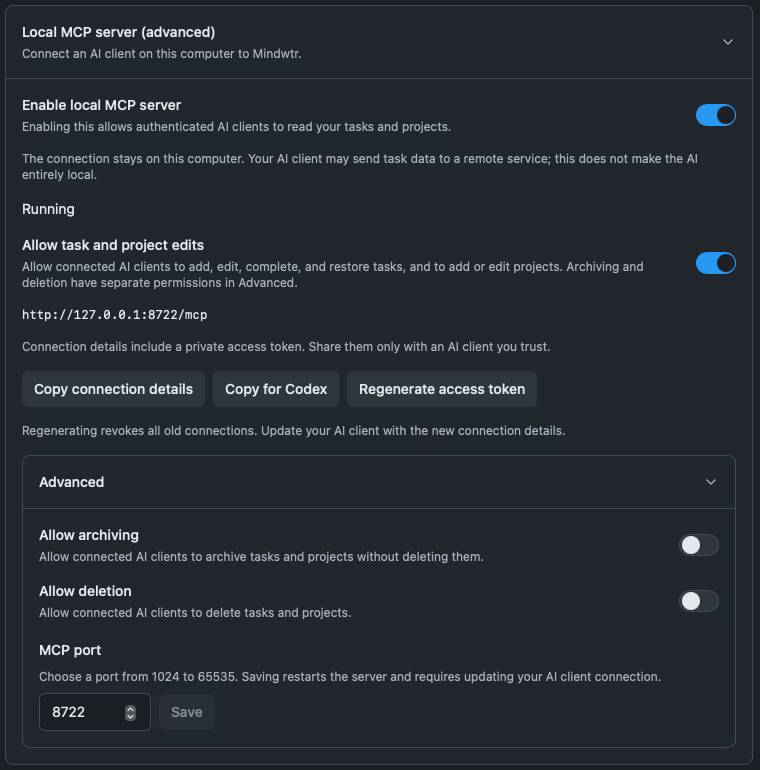
So how does an AI work with an app it wasn't built into? The app publishes a short menu of things an agent may ask it to do: "list my tasks", "add a task", "mark this one done". The agent reads the menu and asks. The app does the work. This plug between them is called MCP, short for Model Context Protocol. Remember, the AI only writes text. The menu is how its text turns into actions that the app agrees to.
The app decides what's on the menu. In Mindwtr, reading your list is the default, and editing, archiving and deleting are each a separate switch. For the demo everything is turned on.
Dana's list, in an app
- Projects
- Next actions
- Waiting for
- Someday
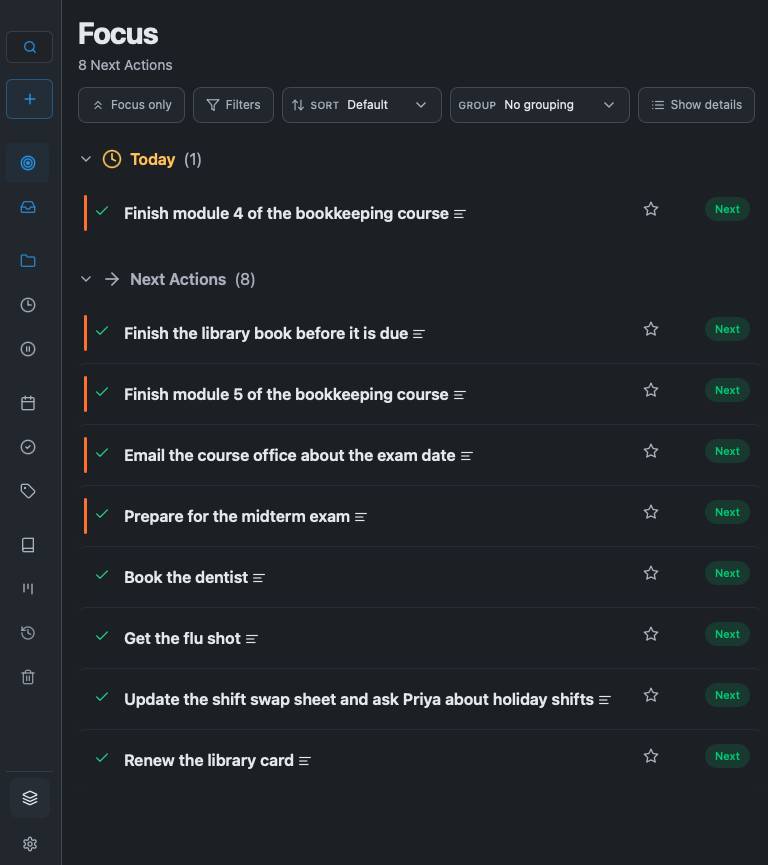
This is the same Dana, now in an app. Her projects, her next actions, the things she's waiting on from other people, and the someday ideas.
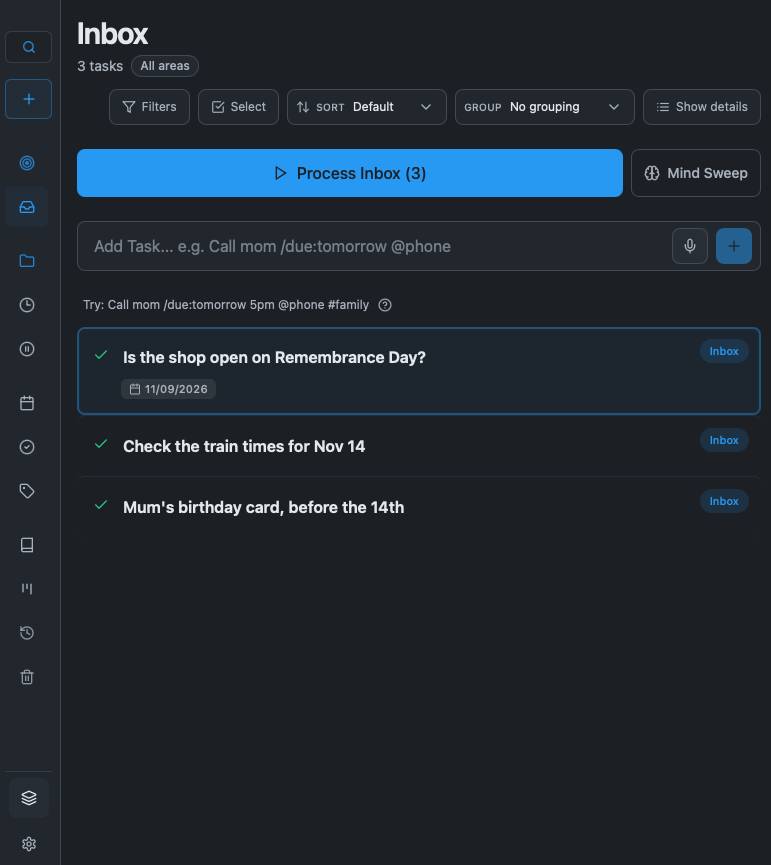
Use Mindwtr. What is in Dana's inbox?
- Watch it use MCP, then read the answer
Now go back to your agent and ask it what's in Dana's inbox. Watch it pick from the menu, and then read its answer.
Update mindwtr with our review
Then ask it to make the changes from her review: tick off the flu shot, split the swap sheet item in two, and add next week's small steps and clean up old tasks.
Go back into Mindwtr and confirm the changes.
Assistants you can pay for
- Claude Duet (preview, $30/m)
- Meta Muse (free)
- OpenAI dots ($120+/month)
- Google Gemini Spark ($30/m)
- OpenClaw (pay per token)
- Hermes Agent (free / pay per token)
The big AI companies have all designed an assistant that doesn't wait for you to open a chat. These work on a computer in the cloud.
This is the clock we talked about at the start, plus the list and the log, sold as a package. If you can pay for it, it will be good at doing weekly reviews. You may not be able to customize it as easily.
Three questions to ask first. What can it read? What can it do without asking? And what happens to your list if you stop paying?
The last two, OpenClaw and Hermes Agent, are open source. They take more effort to set up, but you can use any AI with them, they are fully configurable, and the AI can even change the harness, the software that makes it into an agent. I use Hermes Agent myself and I'm a big fan. These assistants run on your computer and have access to your files, so you need to be careful using them.
Four places to GSD
- Paper or a text file.
- An app like Mindwtr. (Free if opensource)
- An agent that reads your files, once you trust one.
- A paid assistant that does the nudging for you.
So there are four places to keep a system like this. Paper or a text file, which is free forever. An app with a review built in, like Mindwtr. If it is opensource it is also free forever and your agent can help you customize it. You can just use an agent that reads and writes your lists, once you trust one. Or a paid assistant that is more proactive.
The vision for the consumer AI assistants is a very proactive assistant that anticipates your needs. This sounds like magic, and right now it mostly is an illusion, but a year from now it may be a really powerful way to GSD - at the cost of sharing your personal information with a company. I'm using my personal AI assistant, with the Deepseek Chinese AI, but I still don't share my emails with it and I'll keep my to-do list focused on work until I get an AI running on my own computer so no data goes to a company that I need to trust.
Sources
- Allen, D. (2001). Getting Things Done: The Art of Stress-Free Productivity. See also Wikipedia, "Getting Things Done".
- Harkin, B. et al. (2016). "Does monitoring goal progress promote goal attainment? A meta-analysis of the experimental evidence." Psychological Bulletin 142(2).
- Sharma, M. et al. (2023). "Towards Understanding Sycophancy in Language Models." Anthropic.