Make Your Own Interactive Story with AI
Contents
Vibe-coding
We're going to be doing vibe-coding in this workshop, which is just another way of saying that we're going to be programming using regular language, not a programming language. We tell the AI what we want and it writes the code for us.
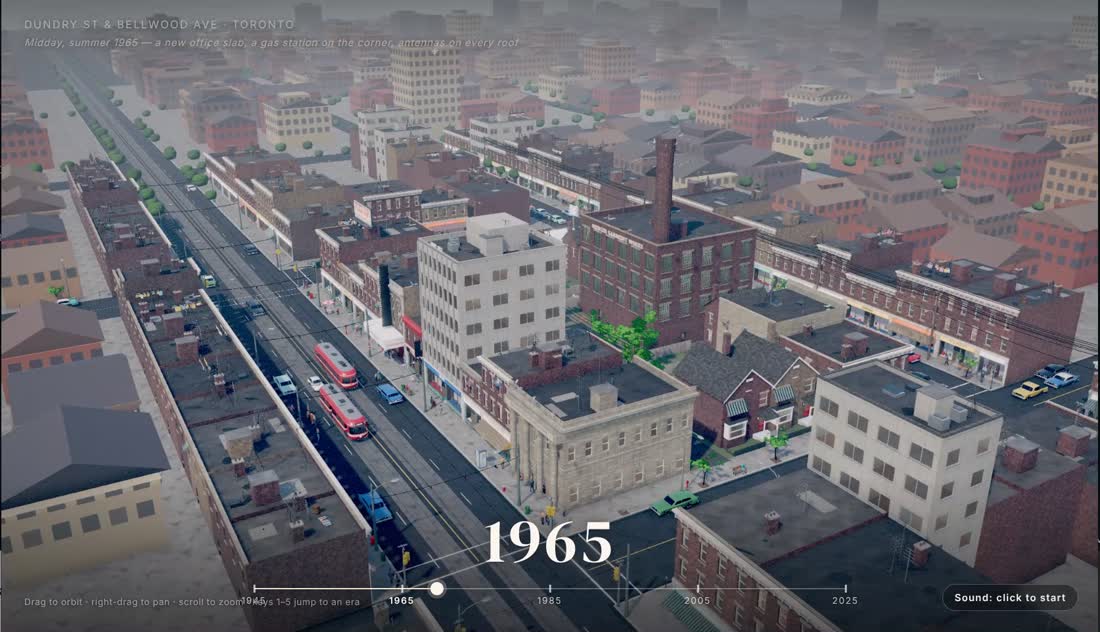
The best AIs are getting extremely good at creating software, including video games. You may have seen some examples online, it is becoming popular to get your AI to spend hours coding up something really spectacular, like this demo you see here that someone made of a timelapse 3D neighbourhood in Toronto.
Vibe-code an Interactive Story
We're going to start with something that is much easier and in some ways harder and we can do in an hour or so. It is easier because we need the AI to be able to build it in a few minutes and harder because making a good game is not really about coding, it's about storytelling. Most of the vibe-coding demos you see aren't games, they are tech demos. AI can make something playable, but it struggles at making it fun and meaningful.
So we'll be making a story where the reader chooses what happens, and an AI builds it with you. You don't need to know how to code. By the end you'll have something that plays in a web browser, that you can take home and send to anyone. Vibe-coding an interactive story still uses the same process as any vibe-coding project, but it also demonstrates that the hard part, that is more true now than ever, is coming up with an interesting story, not the software.
Here's how the evening goes. We'll play an interactive story where the AI is the narrator and talk about it. Then I'll talk about vibe-coding and making stories. Then you'll work with the AI assistant on your machine in three steps: decide what your story is, build the most important scene all the way through, then grow the rest out from it. Then we'll show each other what we made, in small groups, and then you'll have some free time to play, break things and fix them. Before you go, you'll copy your story to a USB stick.
1. Stories where you choose
The reader decides
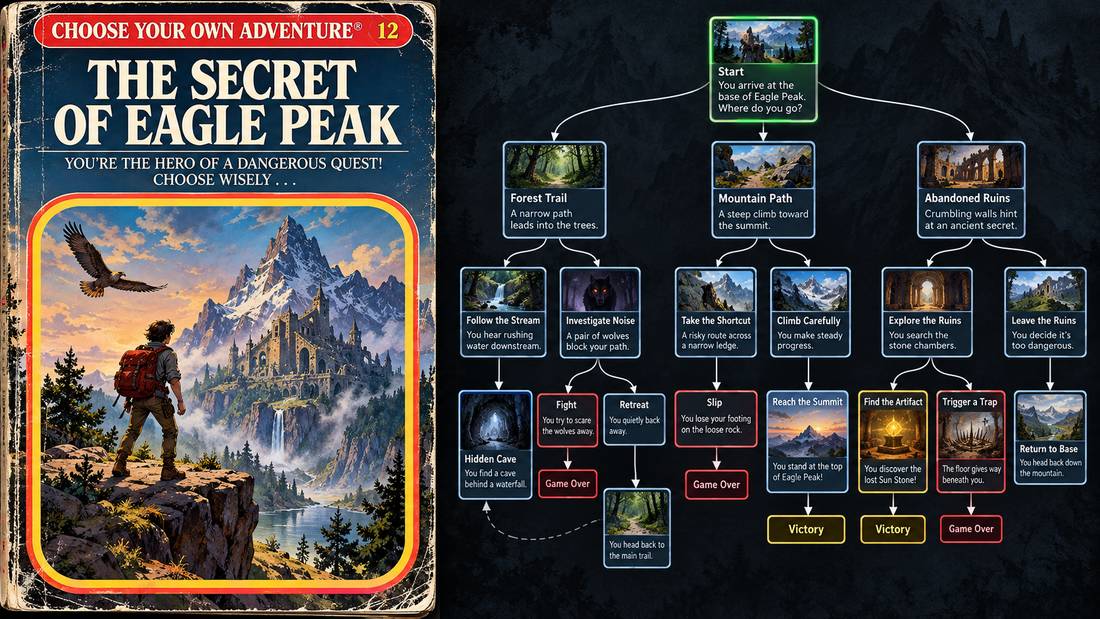
Stories where the reader chooses are much older than computers. I read countless Choose Your Own Adventure books when I was a kid and started playing Dungeons & Dragons in high school and I still play today. The form got a lot easier to make in 2009, when Chris Klimas released Twine, a free tool that lets you write a branching story as a map of boxes and arrows, with no programming. A lot of people who never thought of themselves as game makers made games with it, and some of them made things nobody else was making.
What a branching story needs, underneath, is something to keep track of where the reader is, what they have picked up and which choices they have made. That's called the engine, and until recently somebody had to build it, or borrow one.
Without AI, a story needs an engine.
With AI, the AI is the engine.
There are two main ways to do interactive fiction with AI. If there's no AI involved, a story needs an engine to be playable. If there is an AI in the loop, the AI can simply be the engine: you tell it the world and it plays the story with you, as a conversation.
Let me show you the AI driven story first, and then you're going to build the engine.

The Lighthouse
I want to play the Lighthouse game.
Let's start with a story where the AI is the narrator. Tell your assistant you want to play the Lighthouse game, and it becomes the storyteller. I'll be playing too. Same story, same prompt, but your own choices, so yours will go somewhere different.
OK, so that is a simple example of letting the AI be the storyteller, sort of the equivalent of playing Dungeons & Dragons or another role-playing game with the AI as the game master.
It's a lot of fun, and it has problems. It only works while the model is there, so if you wanted other people to play it they need access to an AI or you'd need money to pay for the AI. And it drifts: the more we play, the more it forgets what it told us, because the only thing holding the world together is the notes from the prompt we gave it. It is pretty hard for you to control all aspects of the story, and the more details you give the AI about how it should act the more confused it can get. The AI is improvising, so your role as director or storyteller is pretty hands off, but this is a very interesting and fun way to explore story ideas yourself.
We're going to make the other kind of story tonight, where the AI helps you build the story engine, but each time you play the story remains consistent and the story itself is much more under your own control.
You can also mix the styles where the plot points are scripted but the AI can adlib some of the details and dialogue.
2. Your machine
Your agent on your machine
- Chat: the AI talks. It can't touch your files.
- Code tab: the AI works in a folder on this computer.
- Harness: the program around the AI that gives it hands.
Tonight's tool is the Claude app on your computer, in its Code tab. I played the Lighthouse in the Chat tab, which is much like the Claude website. In a chat, the AI can only talk. It can't open a file on this computer. If you want to keep something, you copy it out yourself. Yours ran here in the Code tab, which can do more than talk.
The Code tab is different. It works inside a folder we've set up for you on this computer. There, the AI can read files, make new ones, change them, and run them. It can build your story, test it, and fix it.
Underneath, it's the same kind of AI model. What's different is the program around it, and that program has a name: a harness. Think of the harness on a horse. The horse has the strength. The harness connects it to the cart. In the same way, the AI model has the brains, and the harness gives it hands. When the AI asks to open a file, the harness does it, and tells the AI what happened. And the harness stops to ask you before it changes anything.
Why we call it an agent
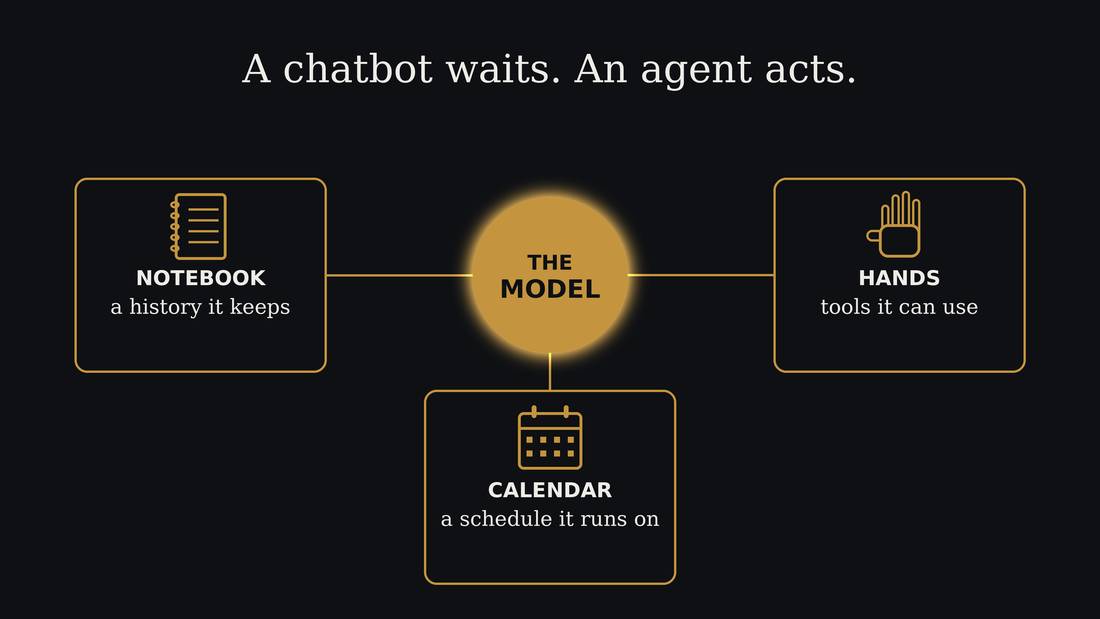
This diagram is from my agents workshop. A chatbot waits for you to ask. An agent acts. The model is still in the middle. Around it are the extra parts, and those parts together are the harness. Tonight the hands matter most: they're what let it work on the files in your folder.
Because it can act, and not only talk, we call it an AI agent. A coding agent is one that works on code. It takes your request, makes a plan, does one step, looks at the result, and does the next step. It keeps going like that until the job is done, or until it needs you. That's why you can say "build me a story" and not "write me a paragraph".
Two ways to make it play
- Twine: a ready-made story player
- Engine: one the AI writes from scratch, for your story
Let's make our story engine now. There are two ways: Twine, or HTML, where the AI creates an engine from scratch. Both will be saved to a single HTML file that you can take home. The reason to have both is to give you an idea that the AI can work with existing software or build its own. Both approaches have different strengths and weaknesses.
Twine
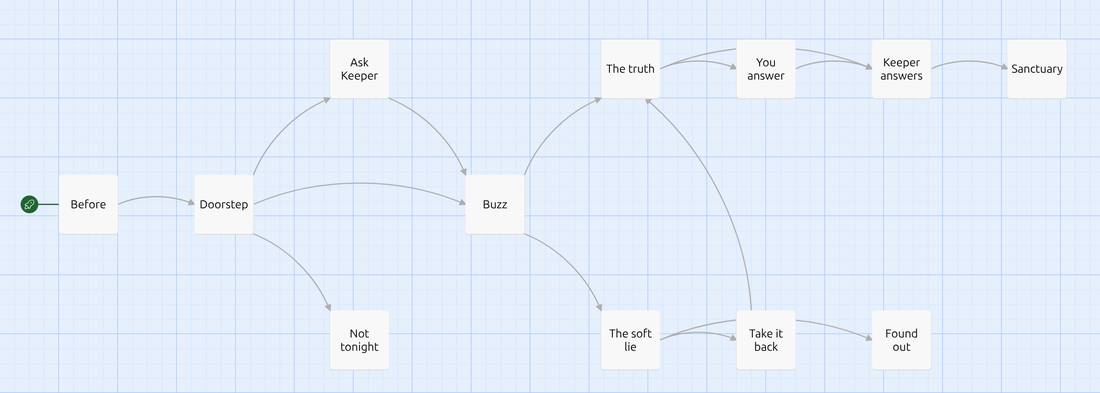
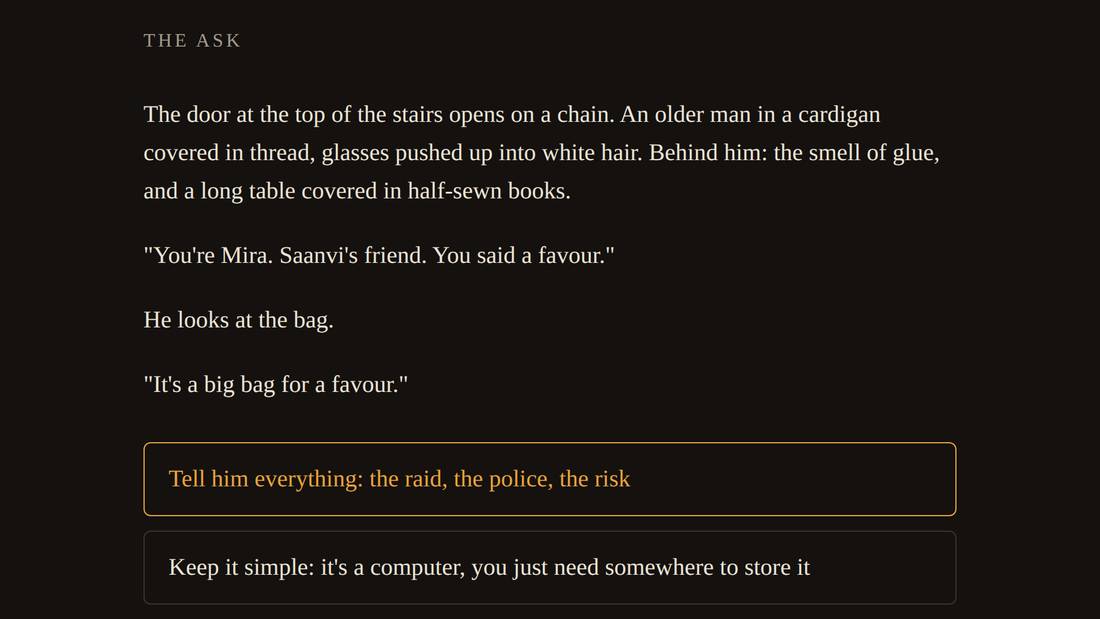
With Twine the assistant writes your story in Twine's format and it plays in Twine's own player, the same one used by thousands of stories online. A Twine story can be viewed as a story map like this.
HTML
The other way is an engine the AI writes from scratch, just for your story. You also pick some gimmick: you carry things, a clock is ticking, there's a meter that goes up or down, a map, dice. Creating an engine from scratch in HTML is more work for the machine, and more can go wrong, but AI is pretty good at HTML these days so I've never seen it go too wrong.
Three amounts of you
- Level 1: the AI leads, you choose. It offers, you pick, change or cut.
- Level 2: you decide, the AI writes. Your answers, its sentences, and you write the key choice and one ending.
- Level 3: you write, the AI helps. Every scene is yours; it builds the rest.
Writing a whole branching story yourself takes days, and we have an hour. So there is a setting for how much of the writing is yours. There are three levels. Combined with Twine and HTML, that makes six ways of building. In the room, each machine has one of the six, shared out at random, so when we share at the end we can see how the same steps felt each way.
The code, the file format and the testing are the assistant's job at every level.
Before you type
- Stories are fiction. No real people, nothing about your own life.
- The assistant will ask before it changes anything. Read the question, then choose.
- When I call a new step, tell your assistant.
- Stuck, or nothing's happening for a few minutes? Ask for help.
Your story can be about anything suitable for a library room, but keep it fiction. Your assistant doesn't need your name, your email or anything about you.
Now and then it will stop and ask permission to create or change a file. That's normal. Read what it says, and if it makes sense, say yes.
When I call each step, tell your assistant in plain words: "we're on the next step now". It knows the plan.
3. Building
1 · Direction
- genre
- one to three favourite authors
- five lines: where, who you are, what's wrong, what's at stake, what you can do
- how you want the player to feel at the end
- five to eight scenes, with one marked the key choice
Step one is deciding what the story is. Your assistant will ask you one thing at a time. The most important thing to find is the key choice: the moment where the player's decision matters most. Everything else is built out from that scene.
2 · Build the key choice
We're on the key choice now.
- the key scene, all the way through
- its choices lead to scenes that aren't written yet
- play it, find what's wrong, fix it
Tell it: "We're on the key choice now."
Now build the key-choice scene all the way through, before anything else. That's how game studios work: build one level properly, then build the rest. When it's done, the story plays straight into that scene, and every choice leads to a placeholder that says "not written yet". Play it. Try every choice. Tell your assistant what's wrong.
While the assistant is working, and it can take a few minutes, I'll be talking about some of the ideas behind this. Listen in if you like; you can also just watch your screen.
World building
An AI can't hold a world you never wrote down. If you don't specify everything it invents, and if you do it drifts and forgets. So write five lines: where, who you are, what's wrong, what's at stake, what you can do about it. If your story has people in it, write what each one wants and what each one would never say. And don't ask the AI to write your world, because its version will be smooth and generic. Ask it to interview you, and write down the answers in your own words. The world-building card has the prompt, and a ten-minute game called The Flip, which comes from Ben Robbins's game In This World, to play with friends.
An agent played my game,
and liked it more than I do
One of the interesting things you can do when you make a game with AI is that you can make your game playable by AI.
These agents can also play what you make, and they're very good at it. They'll find the broken link, the choice that goes nowhere, the ending nobody can reach.
I've been working on a game myself, and as an experiment I made it first playable by AI. I've barely played it, but the AI has played against itself hundreds of times. What I've found is that an AI and a person enjoy different things. I was asking my AI what it thought of playing the game prototype and it was pretty enthusiastic, it enjoyed figuring out how the game worked. Then I played it, and granted the game is designed to be played entirely in text and that interface is not the best for people, but I was considerably less impressed with the game than the AI.
So the agent is a great first test, to iron out some of the worst bugs. When your assistant says your story is great, take that as "it works", and let a person tell you whether it's good.
Toronto stories
- Hand Eye Society: handeyesociety.com
- Jim Munroe: nomediakings.org
Hand Eye Society ran WordPlay, a free festival for these sorts of story games, at the Toronto Reference Library from 2012 to 2019, then online. They still support independent game makers in town.
Jim Munroe is a Toronto writer, game designer and cultural organizer, and one of the founders of Hand Eye Society. He has been making interactive fiction and indie games here for years.
3 · Grow it out
Let's expand the story.
- first, the scenes the key choice leads to
- then the opening, and the way to the key scene
- then the endings
- play it again every two or three scenes
Tell it: "Let's expand the story."
Now grow the story out from the middle. How far you get depends a lot on your level, and that's fine. Finishing the key scene when you've written every word yourself is a real achievement.
4. Sharing
Before we share
Tell it: "Time to share."
Time to share.
- make sure it plays from the start
- write your NOTES.md with your assistant: tool and level, the story in one sentence, how far you got, one surprise
Show and tell
- three minutes each, at your machine
- read your NOTES.md, then let someone else play
- the rest of the group: try the weird choice
When it's your turn, read your notes, then hand the keyboard to someone else and let them play. Everyone else, try the choice the writer didn't expect anyone to pick. That's where the bugs live.
Discuss
OK, so we've made some games and played some games. We didn't have a lot of time to make them very complex. They are just text, but you could start adding AI generated images, music, sound effects. You could add inventory systems and combat systems. These are all things you plan and design with the AI and then it can implement them for you.
Stories as software design
I want to mention something else important: I chose interactive stories for teaching vibe-coding because creating a story is a very good metaphor for a similar process you want to go through to create other types of software. You want to create the story of you using that software first and you can have the AI role-play as storyteller first, creating the software on the fly as you talk through it, you can create a choose your own adventure of how you use the software that has the story map of the interactions between user and software. These help you think through what the software should do and how it helps people and then that becomes an amazing resource for the AI to reference to check for how the software should work when its building the software.
Review loops
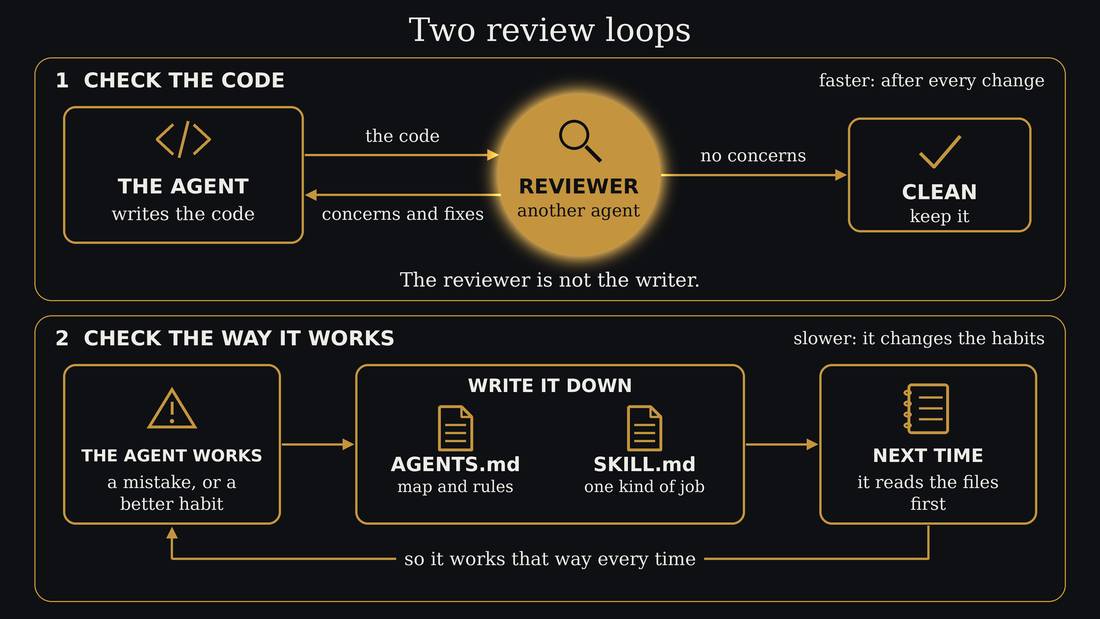
There is an important rule when vibe-coding once your project gets more complicated. You need two kinds of review loop. First is a review of any code that is added. It is important to have the reviewer be separate from the agent that wrote the code. I generally ask the agent to review the code using a subagent. Most harnesses like Claude just let you ask for this. The reviewer will suggest fixes and concerns that can then be fixed.
The other review loop is at a meta level. This is the process that the agent is going through to do the work, such as always reviewing the code after completing a new feature or making a bug fix. This information is written into text files that coding agents use to direct their workflow. A skill is instructions for a particular kind of work, and AGENTS.md is a roadmap to the project and general workflow rules. All of these can be created by your AI as needed.
5. Close
Thank you
Thanks for making something with me tonight. If you want to keep going, the story file works on any computer, any AI assistant will help you keep working on it, and the home card says how.
If you want to keep exploring vibe-coding, our hackathon on December 12 is about digital rights and community tools: small things that help people in their own neighbourhoods, built the way you built tonight. Come and build one with us. The home card has the details.