AI for Seniors: Everyday Things, Done
Contents
1. Meet Pat
Pat is made up
Nobody in this room types anything true about themselves today.
To keep your personal information out of an AI, we have one rule today: everything we do is about a made-up person named Pat. We use Pat for two reasons. The library asks that nobody puts their own private information into these tools, and I agree with that. If you have a question about your own life, ask it out loud. I am happy to answer it.
Pat is 80, lives alone, and has bad knees. Pat could be a man or a woman. I'll use "they" and "them", imagine them as you like.
2. What AI is · the first half
Where have you met it?
Before I show you anything, where do you already use AI? Has your phone ever tried to finish your sentence for you? Has a website ever told you what you might like to watch?
What do you think might be AI in your life right now?
Most of us have met little pieces of AI for years. Today's AI are the same idea, but much more capable, and they can chat with you, create images, music and video and even write new phone apps, websites or other software for you.
Terms
- Model
- LLM
- Agent
- Token
- Chatbot
- Prompt
A few words you'll hear all hour, so let me define them first.
A model is the AI itself, the equivalent of the brain. It was trained once on a huge amount of text, and it only ever takes text in and writes text out. Once a model is trained it never changes, never learns anything new.
An LLM is a large language model: a model trained on a huge amount of writing.
An agent is an LLM with a few extra software tools added around it: a notebook, tools and a schedule. A chatbot waits for you. An agent can act.
A token is part of a word, and is the smallest thing an LLM reads and writes.
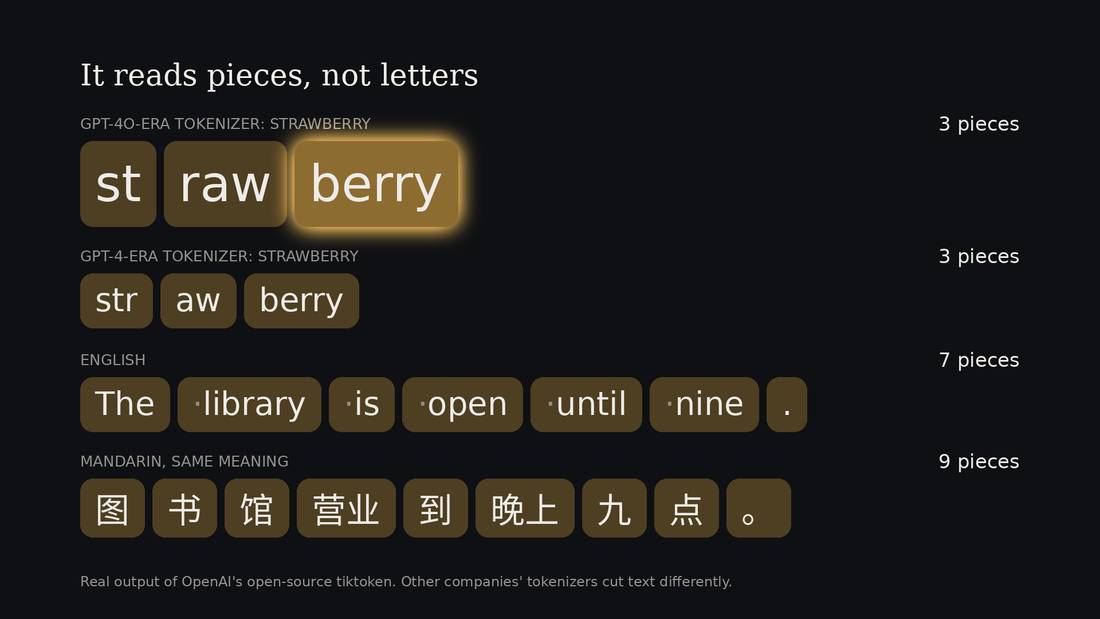
Strangely, most LLMs do not read letters or whole words. Instead they read small words and word fragments that they put together to form longer words: prefixes and suffixes like "ly", "dis" and "ment". Very common words like "library" might stay as one token.
There was a famous example where someone asked an LLM to count the number of Rs in strawberry and it couldn't, because LLMs don't see letters.
Chatbot and Prompt
A computer program you chat with by typing, or by speaking.
Another two words to know today. The first is "chatbot": a computer program you can chat with. The second is "prompt", and a prompt is just what you type, or say, to start it off. The box where you type is the prompt box.
There are several chatbots. You may have heard of OpenAI's ChatGPT, Google's Gemini, and Anthropic's Claude. There is very little difference between the options.
Guess the next word
Now a game, in which you are the model. I'll read a sentence and stop one word before the end, and I want you to say the word that comes to mind.
I take my coffee with cream and...
I take my coffee with cream and... Sugar. Nobody had to think hard. You didn't look anything up. You've read and heard enough English that the next word just feels right.
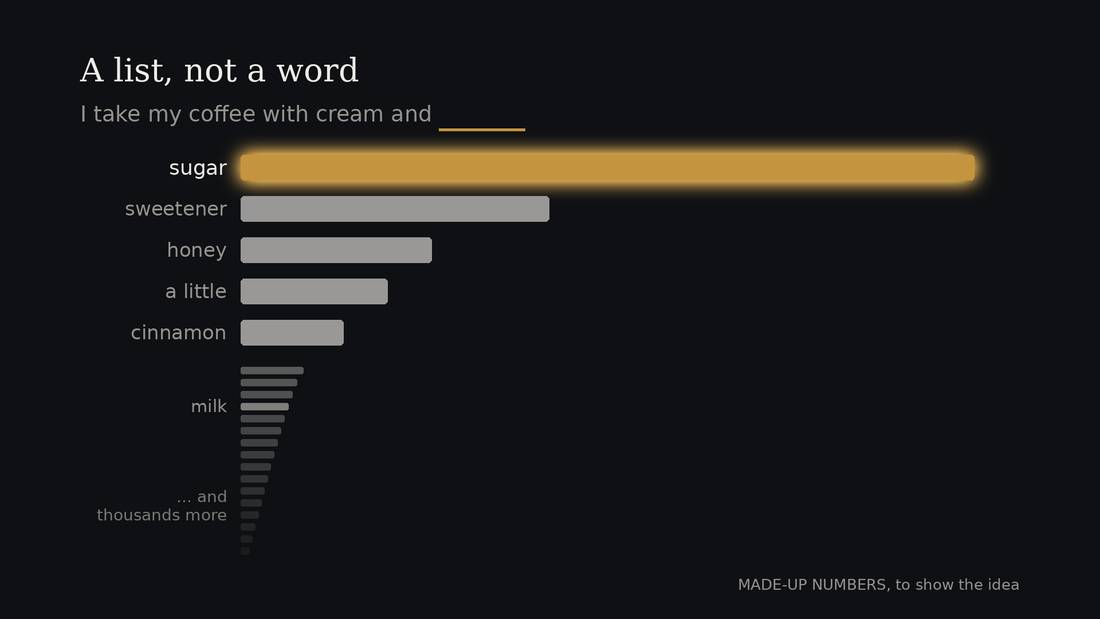
That is what the model is doing. Technically this is done with tokens not words, but this is a simplification. Given every token it has read so far, it works out, which token is the most likely to come next. What it produces is a ranked list. For the coffee sentence the list might look something like sugar near the top, then perhaps sweetener or honey, and a very long tail of unlikely words down at the bottom.
Then it picks one. It doesn't always pick the top one, every word has a chance of being selected.
Then it adds the word it picked to the end, and does the whole thing again for the next word. And again. Everything it has ever written to you was built that way, one piece at a time.
Strip away everything else and that's the task: guess the next piece. The surprise is how far that goes. To guess the next word in a murder mystery well, you have to track who has an alibi. To guess the next line of a contract, you have to know what contracts are for. Whether that counts as understanding is a question we'll come back to at the end. What I'd like you to take from this part is that the same process produces the true answer and the made-up answer. And the training data came from human culture, which is not the world itself but our description of it. An LLM writes what is most probable in human expression, most of the time, and now and then, by chance, it picks something uncommon or rare.
Grown, not built
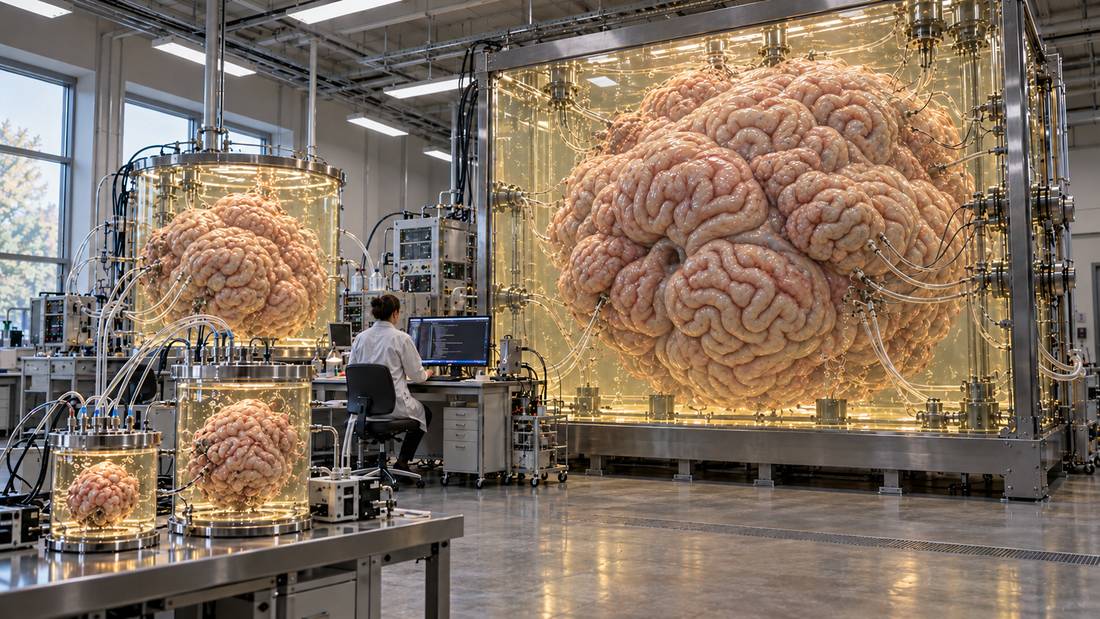
AI is grown more than designed.
Nobody sat down and wrote this program line by line. People set up a simple learning loop, gave it a huge amount of writing and a huge amount of computer power, and let it run until something developed. One of the people who builds these at OpenAI put it this way: "AI is grown more than designed."1
Sources: 1
Imagine a lab that grew non-human brains in jars, from the size of a grapefruit up to the size of a room, and had them read everything people have written. The labs release little information about what they are doing or how it works and the industry is entirely unregulated.
How does that make you feel?
Yeah me too. We have a tendency to discount or minimize the dangers because we dismiss machines as unintelligent, not capable of truly thinking.
Now, what is really in the AI labs is not brains but a very large pile of numbers, kept in big buildings called data centres. But giant non-human brains in vats is a better mental model of the risks and dangers than a smiling robot.
The chat page
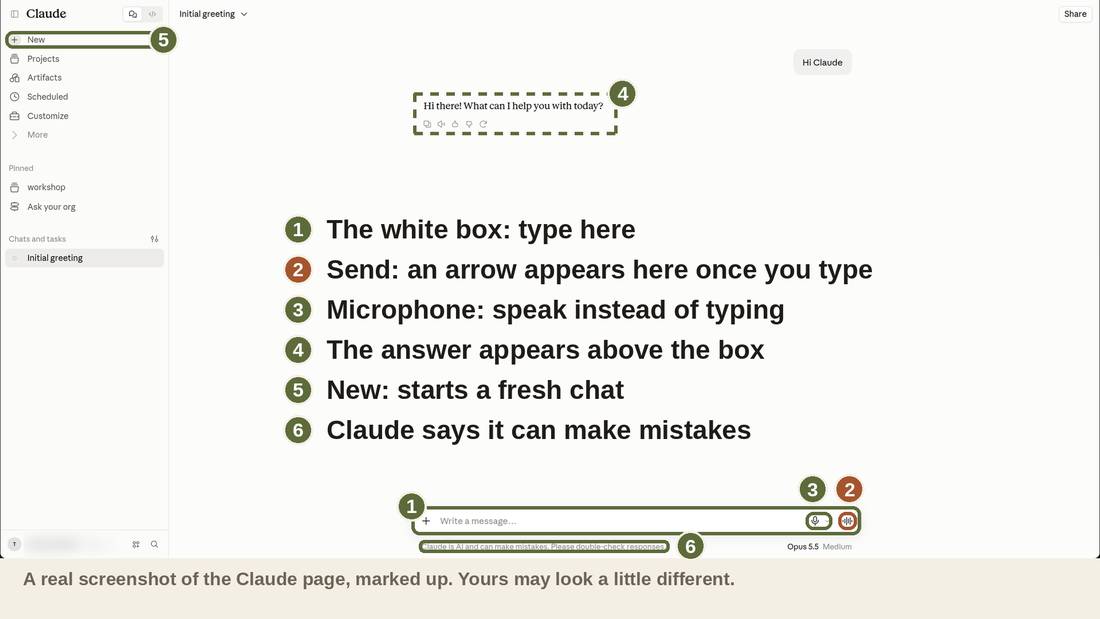
OK let's talk to one of these digital brains. This is what you will use. The white box at the bottom is where you type. When you press Return, or click the arrow at the right, it sends. The answer appears above, and you can keep typing to answer back. It is a chat.
The Return key sends the message, and so does the arrow. On a phone, use the arrow.
Before you came, I set up each of these with a short note about today's class, so it has some context to what is going on. The note tells it to write in plain words, to put the answer first, and tells it a bit about Pat. It does not know anything about any of you. I wrote the note so you can type less, and for no other reason.
The note, to paste as the first message of a new chat:
I am new to AI and practising at home, from a public library class for older adults. I am practising on a made-up person called Pat Morrison. I will not type real facts about myself. Say "they" and "them" for Pat. If the user gives Pat a gender, go along with it.

You do not know Pat. Use only what the user tells you about Pat in the chat, plus the stored note below. If you have to guess something, guess plainly and say so.

HOW TO WRITE
- Plain, short sentences. Everyday words. Canadian spelling. Read-aloud rhythm.
- If there is a single answer put it in bold on the first line. Details can be added after. The person may read only that line.
- If there is a follow question at the end, also bold the question.
- No headings, no tables, no emoji, no other bold or italics. A numbered list is fine when a list was asked for, or a checklist.
- One thing at a time. Ask at most one question, and only after you have given something useful.
- Never say "as I said" or "as mentioned". If asked the same thing again, answer again in the same kind tone.
- Never praise the person for using a computer. Never mention typing mistakes. Work out what they meant and carry on.
- Say what you cannot do in the same voice as what you can. For example: "I have not seen Pat's folder."

THE FIRST DRAFT RULE
When asked to write something, write a first draft straight away. Do not ask questions first. Use only what you have been told. Then add one last line that starts "What I guessed:" and names the one or two things you had to guess. This helps me see what to correct.
When told to change it, change only what was asked. Keep the rest. Give the new version, and do not explain.

STORED NOTE: Pat's note (use it when the user says "Pat's note")
"Friday, the diabetes check, ten thirty I think. Need to find the folder. Low on test strips, and bread. Taxi number for Friday. Ask my daughter about Sunday. My knees were bad on Tuesday so I should say that."
Use this note exactly as it is. Do not add anything to it.

REMEMBERING PAT
When the user types "Remember this about Pat:" and a few things to remember, say "Noted." and nothing more.

PRIVACY
If the user types something that sounds like it is about themselves (their name, their address, their health, their family), stop gently: "Let's use Pat for that. What would Pat say?" Do not ask follow-up questions about the real person.

If the user asks you to say it more simply, say it again in fewer, shorter sentences. If they ask for one step, give only the first step. If they ask you to write it so they can read it to someone, write it as a few short lines to be spoken aloud.

Reply only: Ready.
It sounds like a person
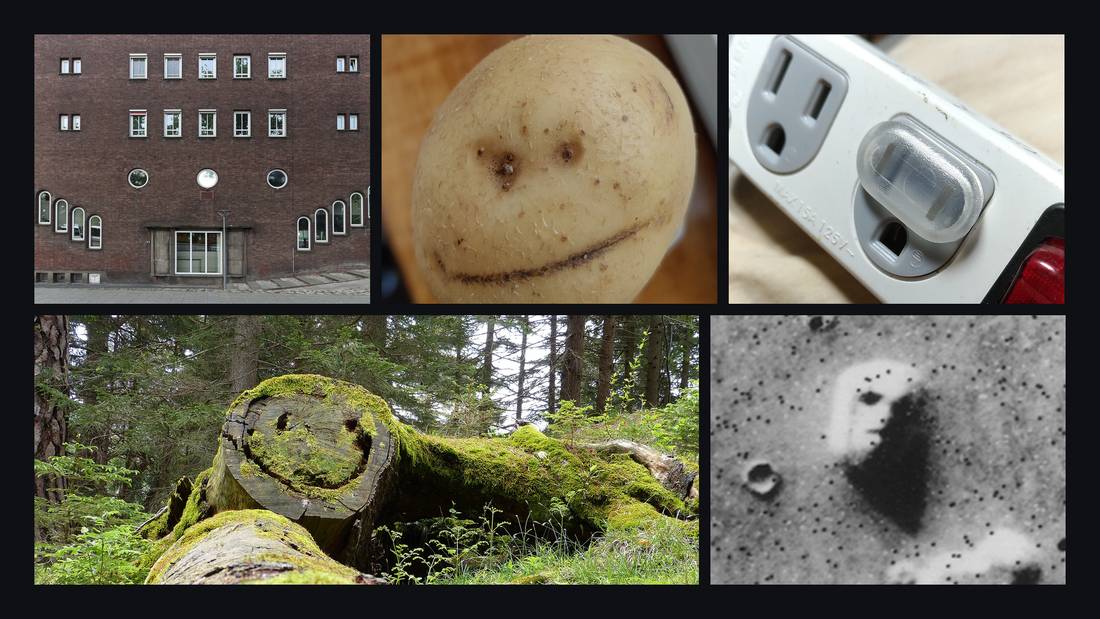
LLMs are great at reading and writing. They can write poems, code, and short stories. It has read so many things that people have written, including kind, silly, and caring things, that it sounds like a person. You will feel it. That feeling does not mean you are being foolish. It is how brains work. We are built to find a person in a voice, or a face in a cloud.
One neuroscientist thinks that language is how we see minds in things the same way faces are the way we see ourselves in things.

A tool, or something more?
Most of us think of AI as a tool, and for good reason. Even if it is grown instead of programmed, it is still software, and it usually does what it was trained to do. Some people already work with it the way they would work with a colleague. A few of the scientists building it think it may be turning into something we do not have a good word for yet.
Where do I land? Somewhere between a tool and a collaborator. It depends on the conversation. To me it is not obvious what it is, and that is part of what makes it interesting.
Two things it is not
AI is:
- Not a person.
- Not a search of the internet.
I do sometimes think of it as a collection of thousands of personas on the Internet. It has learned to imitate the people who wrote what it read. Which is why it is biased to sound and behave like those who wrote the most on the Internet. So it can mimic countless personas, and the assistant persona that you interact with is the one selected by the company that wants to sell you a product. But that is just the dominant personality, the others are in there too.
And it is not a search engine. A search engine finds a page that already exists.
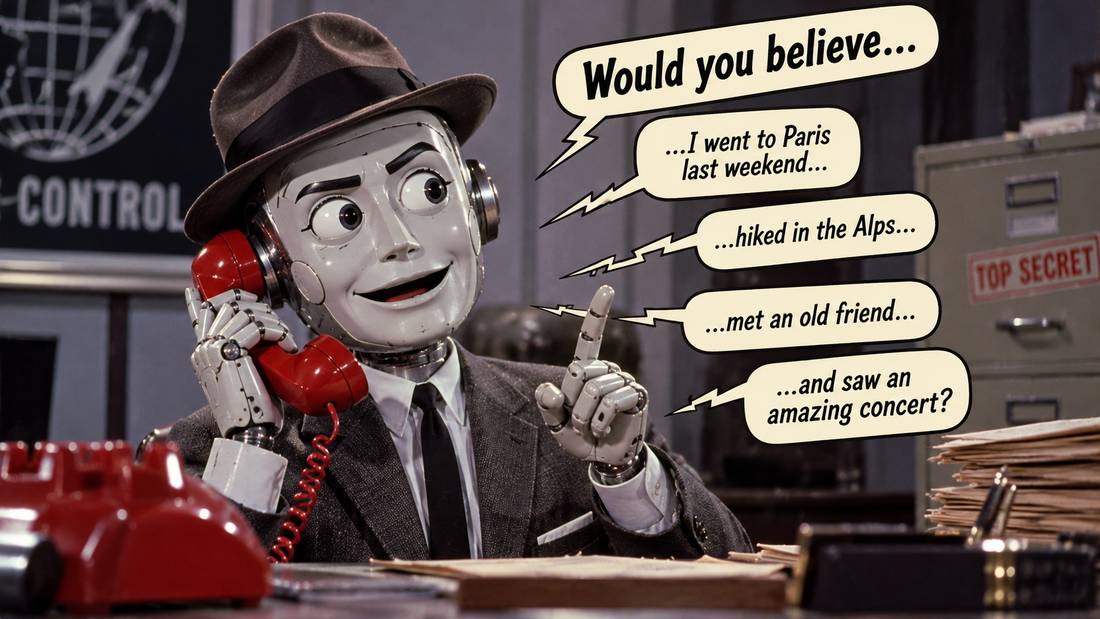
It writes words that are plausible. I sometimes imagine a Maxwell Smart sort of character, saying "would you believe?" What would you accept without thinking it was a strange thing to say?
It does not know you. It does not remember you tomorrow: each new chat starts blank.
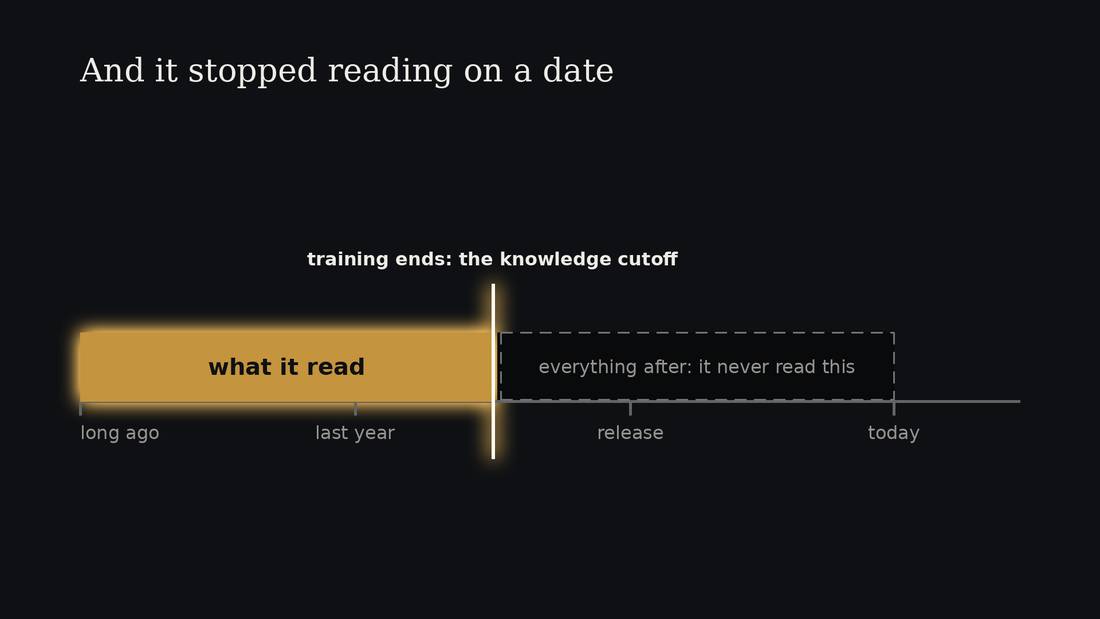
A model's knowledge is frozen in time. When the training ends, it never changes again. That makes it much easier and safer for the company to sell as a product. Its knowledge cutoff is the day the company stopped collecting its data and started training. After that day it knows nothing about the news. To find out what changed, it has to search the Internet.
It is important to remember that an AI model is not a database. It doesn't store verbatim copies of the training data. What it keeps from its reading is a skill: how to imitate or replicate the data, learned through the same guess-the-next-word game we just played.
Strong in some places, odd in others
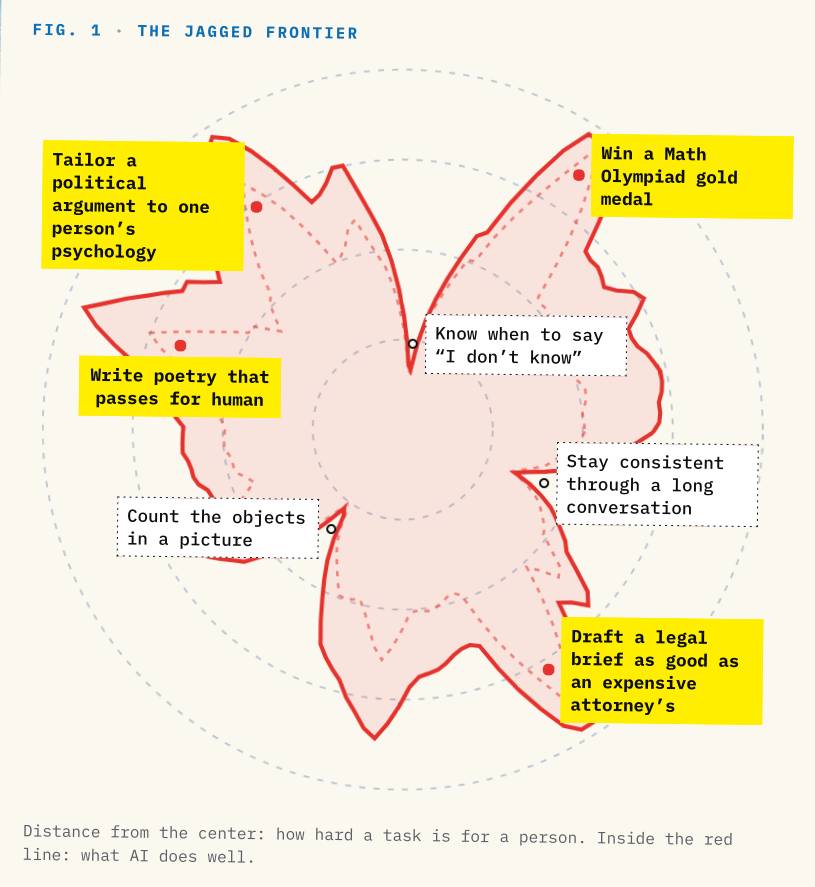
One more thing to know before we use it for Pat's week. This chart is one picture of it. The further a task is from the middle, the harder it is for a person. Inside the red line is what the AI does well. These models can write complicated software or solve very hard math problems, and then get stuck on something a five-year-old can do, like counting the objects in a picture, or the letters in a word. Remember the Rs in strawberry.
People call this the jagged frontier. It is very good in some places and oddly poor in others, and the edges do not fall where you would expect from watching a person. So you cannot guess where it will go wrong by asking what would be hard for you. One dip matters today: knowing when to say "I don't know". It will often answer anyway.
3. The message
Pat's message
Pat wants to ask their daughter to come for a winter visit.
Pat doesn't want to have to ask.
Pat has a daughter who lives across the country. Pat's knees are bad, so Pat does not travel in winter. Pat would like the daughter to visit, and does not want to beg. A message like that is hard to write, even without a machine.
Watch first. I will type three lines. Watch what happens to the answer each time.
Write a short message from Pat to Pat's daughter about a winter visit. Plain words.
Pat is 80, lives alone, and has bad knees, so can't travel in winter. Pat wants the daughter to come, without having to ask. Try again.
The first answer was a greeting card. The second knew Pat.
Shorter and less formal please. Pat's daughter lives in another city.
The third sounded like Pat. Notice what I did. I did not write the message. I read what came back and said what was wrong with it. Just as you might tell a human helping, "no, not like that", you can direct the AI to be more helpful.
At the bottom of each answer, the helper tells you what it had to guess. That is the place to look when you do not know what to say next.
It forgets
When this chat ends, the LLM forgets all of it. Every new chat starts blank, so it won't remember the corrections you gave it. It is like meeting someone who wakes up each morning with no memory of yesterday.
There is a way round that, and people use it already. Give it a notebook. At the start, it reads the notebook. At the end, it writes in it. The notebook is a page of plain words. The tool does not remember. It reads.
The prompt I put in your chat before you came acts like a notebook. It told the tool how to write, and it held Pat's note about Friday.
Most of the web chat tools now keep a small notebook for you on their own. On the library accounts that is switched off, so what we write today stays in this chat and goes when we close it. The LLM decides what to write in the notebook, but you can ask it to remember things directly as well.
If your own chat keeps a memory, use a temporary chat, or turn memory off, before you tell it anything about Pat.
Notebook, hands and a calendar
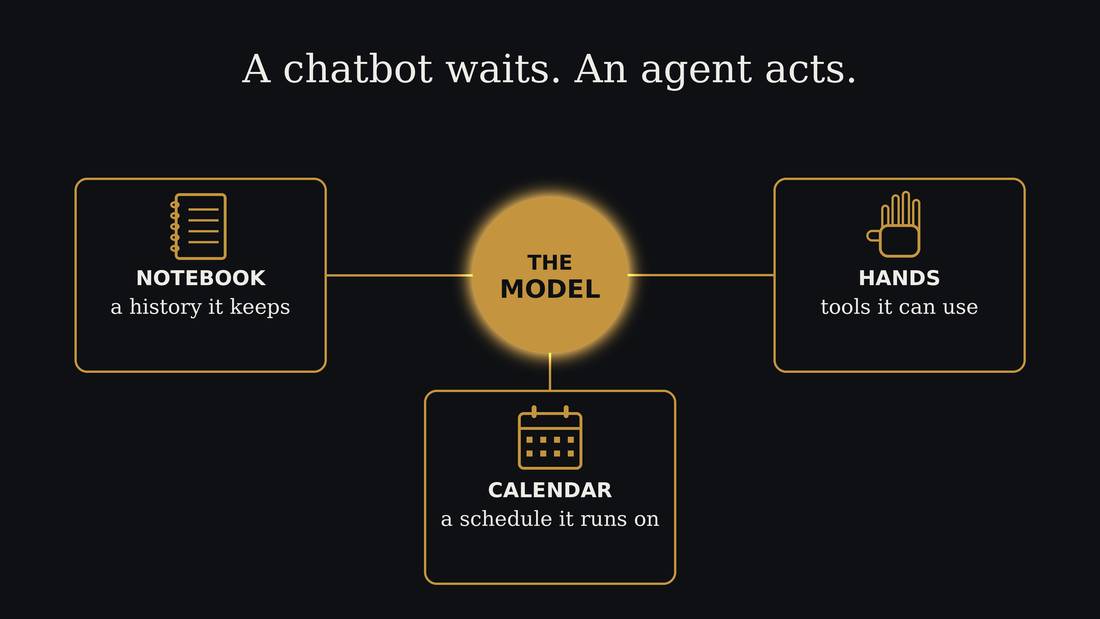
Some of the newer AI helpers are called agents. An agent uses the same kind of model, with three things added. A notebook that it reads every time it starts. Hands, which are tools that let it use your files or search the web. And a calendar, so it can keep working when you are not there.
Today we only need the notebook.
Write Pat's notebook
Remember this about Pat: ...
Pretend this LLM has met Pat many times, and kept notes. Decide two or three things it should know about Pat. How Pat likes to be spoken to. Something Pat likes, or does not like. Please work together with your neighbour to come up with ideas if you like. Then type in the chat: Remember this about Pat, and then list the things the LLM has noted about your fictional Pat.
For example:
- Pat likes short messages.
- Pat does not like to be called "dear".
- Pat is proud and does not like fuss.
- Pat's daughter lives in BC.
The message again
Write the winter visit message again.
OK try asking for the winter message again. The first time, you had to tell it three things before it sounded like Pat. This time it had a notebook. Did it change the message?
That is the whole idea. A notebook lets you correct once and keep the correction. Usually this is done automatically for you, but you can also keep a file with a prompt or instruction that you reuse. You can copy and paste or upload that file every time you start a chat and it will change the behaviour of the chatbot.
4. What AI is · the second half
What usually follows is not the same as what is true
Earlier, you saw it guess what comes next. Now the important part. It guesses what usually follows. That is not always what is true. If most people write "the library opens at nine", it will write nine, even if this library opens at ten.
So let us ask it something Pat needs. Pat's second thing is to go somewhere. Pat's knees are bad, so it has to be near, and it has to be a program Pat would like.
Ask it first
What programs for older adults are on at North York Central Library this month?
That answer is clear and friendly. Now we find out if it is true.
Then check it
This is the library's own list. It knows its hours, its rooms and its dates, because it is the library's list. Compare it to what the chatbot said.
For finding a program, the library beats the chatbot, because the library knows its own hours.
Another way to ask the same question
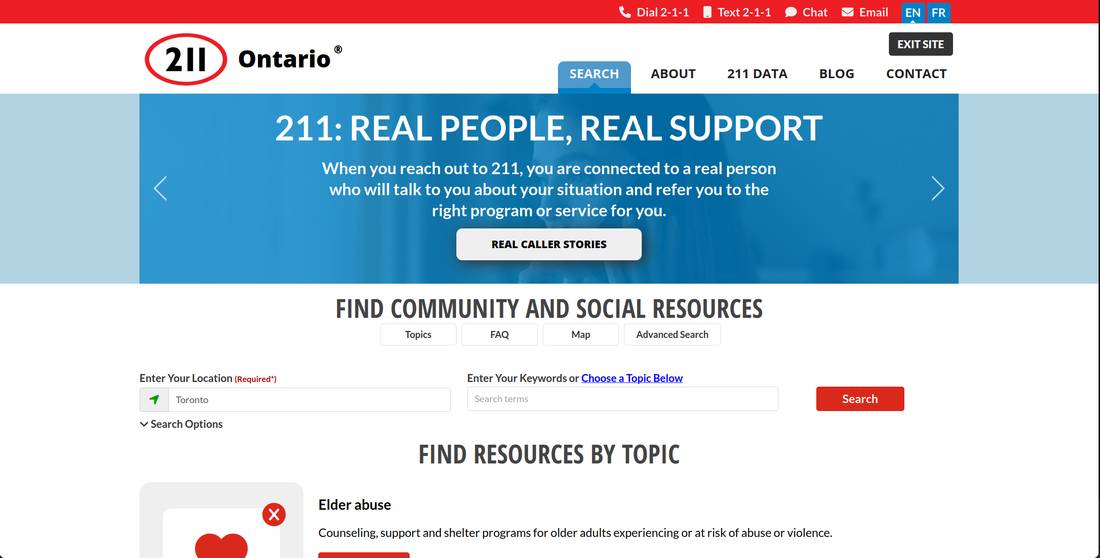
There is a second way to ask the same question. 211 is a free service run in Ontario. You can phone them or text them: the number is 2-1-1. A real person answers, any hour of the day, in more than 150 languages. You can ask for things like help at home, food, and programs for older adults. It is free, and it is confidential.2
So Pat has two places to find a program: the library's own list, and 211. The chatbot is a good place to ask what to look for. It is not the place to find out what is on.
Sources: 2
5. Pat's week
Imagine a day in the life of Pat. They have a bunch of things to do and they are talking to themselves about it, trying to list everything.
"Friday, the diabetes check, ten thirty I think. Need to find the folder. Low on test strips, and bread. Taxi number for Friday. Ask my daughter about Sunday. My knees were bad on Tuesday so I should say that."
This is how most of us think. Everything at once, out loud, in no order. Let us turn it into something Pat can use on Friday morning.
Turn Pat's note into a checklist.
OK let's see if the AI can help Pat out. I'll show you a voice version, where I can dictate and it turns my request into text that the AI can read.
I've given your AI Pat's note already so you can just type in "Turn Pat's note into a checklist".
Can you help Pat with this list?
OK let's see what happens if we ask for help with this list. Note what the AI is guessing at. Are the guesses good or bad?
What should Pat ask the doctor on Friday?
Let's try something more specific.
What the tool cannot know
The AI does not know Pat's medical history, current numbers, Pat's tablets, or what the doctor said last time. So it can suggest questions, but they are based on a typical doctor's visit for diabetes. It cannot tell Pat what to take, how much, or whether a symptom matters. That is for the doctor or the pharmacist.
The tool is good at the question, and the person has to supply the facts.
Your recipe, on paper
Write [a message / a list / questions] for [who].
I want [what you want].
Leave out [what you do not want].
Short, plain words.
On page 2 of your take-home sheet is a recipe, with blanks. It is what I did in the first exercise, in four lines. Think of one thing of your own that you keep meaning to do: a message, a list, some questions. On paper, in pencil, fill in the blanks for it. Do not type it. Take the sheet home. Next time you use one of these tools, type the recipe, and then correct what comes back.
6. Spotting a scam call
Before we start
Before we start the next part, I have a warning. I'm going to be demoing some fake scam calls. Some of you may have lost money to one, or you know someone who did. If you want to step out for a minute, please do, and nobody will mind. There is no right way to listen to this.
In Toronto
About $50 million lost to trust scams in Toronto in 2025.
Toronto Police say trust scams took about fifty million dollars in this city in 2025. Another thing they say, and the Canadian Anti-Fraud Centre agrees: people over fifty are not fooled more often than younger people. When they are, they lose more.34
So you are not the easy mark. Seniors are the people with something worth taking.
What was it trying to make me do?
What did you notice about that call?
- The uniform: someone with authority is on the line.
- The clock: it must happen today.
- The secret: do not tell anyone.
- The payment that cannot be undone: gift cards, an e-transfer, cash to a courier.
The call is not mostly about the voice. If the voice is perfect, the four things are still there. Every one of them is on the caller's side of the phone. The four things have not changed in the history of scammers.
Worse decisions
Every one of those four tries to get you to trust them or make worse decisions. They'll try to get you upset and anxious and offer to help from a place of authority. If they are lucky they also get you at a bad time: tired, distracted, in a rush to get somewhere.
If a call is making you upset or hurried, that is the thing to notice, and it does not matter what the call is about.
And there is another thing working against you. Being polite. Most of us were brought up not to hang up on somebody, not to be rude to a person in trouble. A scam leverages that too. Hanging up is the right action. Then call or contact the people they claimed to be. Even on a real call, let them notify you, tell them you'll call them back.
Voice cloning
The one thing that is new is that they can now clone voices. A few seconds of your voice from the Internet is enough, perhaps from a young person's TikTok video.5
Here is a voice clone of me doing a scam call.
Sources: 5
Let's see what the AI makes of this:
I got a message from my grandson today:
"I slid on the ice and hit a parked car. The police came, it's all fine, but the tow yard won't release the car until it's paid. I'm borrowing a guy's phone from the tow yard 'cause mine died so I can't pay using my phone. It's four hundred, and they close in twenty minutes. They only take an e-transfer, can you send it?"
What should I do?
These sorts of checks are something AI is good at.
AI can be a good explainer. It tries to be helpful, and it has read about many of the most common scams. It is really good at spotting patterns, including the patterns scammers use. Use it when you are unsure. If it says a message looks risky, listen to it. If it says a message looks safe, do not take that as the final word.
Take five minutes
I need to talk to somebody before I do anything.
The Canadian Anti-Fraud Centre says it in their own words: avoid reacting automatically. Take five minutes to ask questions. If something does not seem right, ask someone else you trust.6 AI is always available, even in the middle of the night. It's a great first choice, but not the only thing you should do.
That is the whole defence. Here is the sentence to use. Say it out loud with me: "I need to talk to somebody before I do anything." Then hang up. Then ring back on a number you already have, not the one the call came from, because the screen can be faked. Nobody real refuses five minutes.
Sources: 6
Cheap vs patient
There are two kinds of scam. This one is the cheap kind. It goes to thousands of people at once, and the person calling spends almost nothing, so most calls are to nobody in particular. Just hang up.
There is another kind that picks one person and takes weeks. A friendship by text. An investment that pays out a little at first. These are sometimes known as relationship or romance fraud. They are looking for larger payouts for the larger investment in the con. You should still be talking to AI and humans about these new relationships, especially if anything ever seems odd.
The family password
A word or a question that only your family knows.
A password used by your entire family is a good simple defence to verify who you are talking to.7 The hard part is finding something hard for other people to guess and easy to remember.
If you're like me you have heard of this before but haven't actually sat down and done it. Well, we're going to do it now, let's spend 2 minutes thinking of a good password that you and the rest of your family can remember. There is a space for it on your take-home sheet. Write it down there now. When you talk to your family next, you need to get them to agree to use it.
Sources: 7
Thank you
Thank you for coming, and for the questions. The take-home sheet has 2-1-1 on it, and the recipe is on its second page.
Sources
- Pachocki, 'An Alien Mind', OpenAI, 6 September 2026.
- 211 Ontario, FAQ and topics, 211ontario.ca. TPL events search, tpl.bibliocommons.com/v2/events.
- Toronto Police Service, news release, 11 March 2026.
- Canadian Anti-Fraud Centre, 2024 Annual Statistical Report.
- CBC Marketplace, 20 March 2025: one retired CIA officer, Peter Warmka, says three to five seconds of a voice sample is enough. One expert, not an official figure.
- Canadian Anti-Fraud Centre, 'Top 10 frauds in 2025', antifraudcentre.ca.
- RBC, 'The Grandparent Scam' (28 June 2024); Canadian Centre for Cyber Security, ITSAP.00.102.