Learning Things You Love with AI
Contents
1. Welcome
Learning Things You Love with AI
- Your own notes about something you love
- A list of places to learn it, online and in person
- A quiz or a practice session, made from your notes
- A real group or event near you
- A seven-day plan that still works on a bad day
Today is about learning something you love, or something you want to fall in love with. It could be cooking, drawing, knitting, fixing a bike, a language, chess. An AI can help you learn it, and it cannot do the learning for you. So we will use it in four ways: to help you understand, to help you remember, to give you something to practise, and to help you find other people doing the same thing.
You will leave with a set of your own notes about your hobby, a list of places to learn it, a quiz or a practice session, one real group or event near you, and a plan for next week that works even when you have a bad day. Whatever you start today, you can bring to the Community Hackathon on Saturday December 12, in the Concourse here at North York Central.
Pick one thing
- Something you love, or want to try
- Tell the AI only what you would tell a stranger at a club
- The hobby, what you want to be able to do, how much time you have
- Nothing about your health, your money or where you live
Pick one thing you would like to learn. Cooking, drawing, knitting, a bike, a language, a game, a song. Keep it small. You do not need to be sure. Today works best with something new to you, or something you have only just started. If you already know a lot about yours, that is fine too: tell the AI, and it will skip the basics.
The AI will ask about you, and what you already know about the thing, because it cannot guess that. Decide now what you will say. "I'm new" is a fine answer. Say what you would say to a stranger at a club: the hobby, what you want to be able to do, and how much time you have. Leave out your health, your money and where you live. We use the library's accounts today, but everything you type goes to the AI company.
2. AI, agents, and the harness
Terms
There are a few common terms to get familiar with:
- Model
- LLM
- Chatbot
- Agent
- Prompt
- Vibe-coding
A model is the AI itself, the equivalent of the brain. It only ever takes text in and writes text out.
An LLM is a large language model: a model trained on a huge amount of writing.
A chatbot is a computer program you chat with by typing, or by speaking. ChatGPT, Gemini and Claude are chatbots.
An agent is an LLM with software around it that lets it act. A chatbot waits for you. An agent can act.
A prompt is what you type, or say, to start it off. Usually this refers to the initial set of instructions given to the model.
Vibe-coding is using AI to create software for you. You tell it what you want and it writes the code. You don't need to know anything about coding, but it does help. It's even more helpful to know as much as possible about the problem you're trying to solve.
Agents
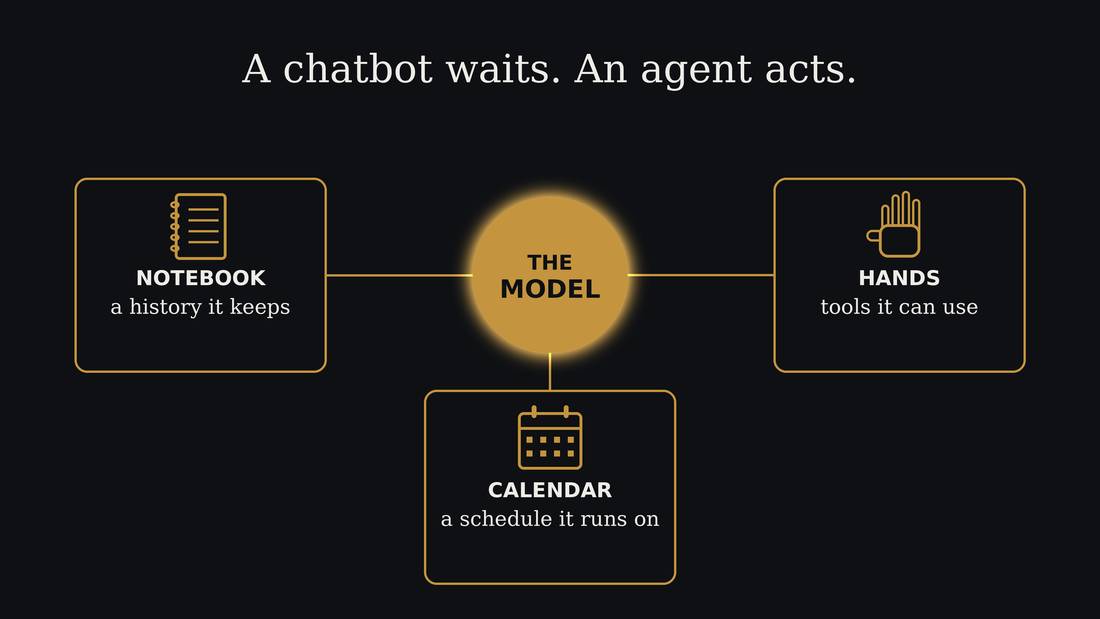
The AI we're using today is the agentic kind, an AI agent. This is what software developers use to write code, and what is being put into the new AI assistant products.
Agents are the AI model combined with regular software that lets it act. The AI model only ever writes text. That's all it can do. It can't click anything, it can't open a file, and it can't send anything. But a program is wrapped around it, the harness, and that program reads what the model writes and acts on it. So when the model writes "send this email to Sam", it's the program around it that really sends it. The AI plus that program is what people call an agent.
The model starts fresh every time. So the program also keeps a notebook for it: files of notes and instructions that it reads at the start.
A model is frozen in time
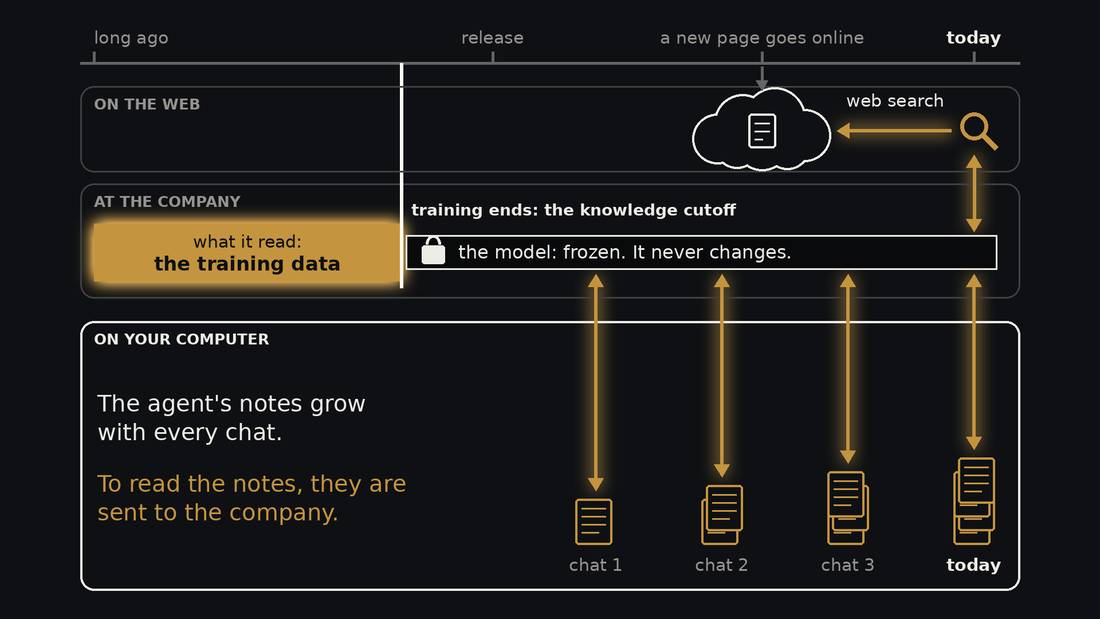
A model is made by training. The company collects a huge pile of writing, the training data, and the model practises on it for months. That is the only time it learns. When training ends, the model is frozen, like a book that has been printed. That day is called its knowledge cutoff. The model never changes again, and it knows nothing that happened after that day.
What does change is your agent's notes. In every chat the agent can write things down, in files on your computer. The notes pile up over time. The model stays the same.
The notes and the model are in two different places. The notes are on your computer. The model lives at the company. So every time the agent reads your notes, they are sent to the company. What it writes comes back and is saved in your files.
The web is a third place. New pages go online every day, long after the model's cutoff, and the model has never read them. A web search is how it gets them. The search brings back a page, and the model reads it.
The context window
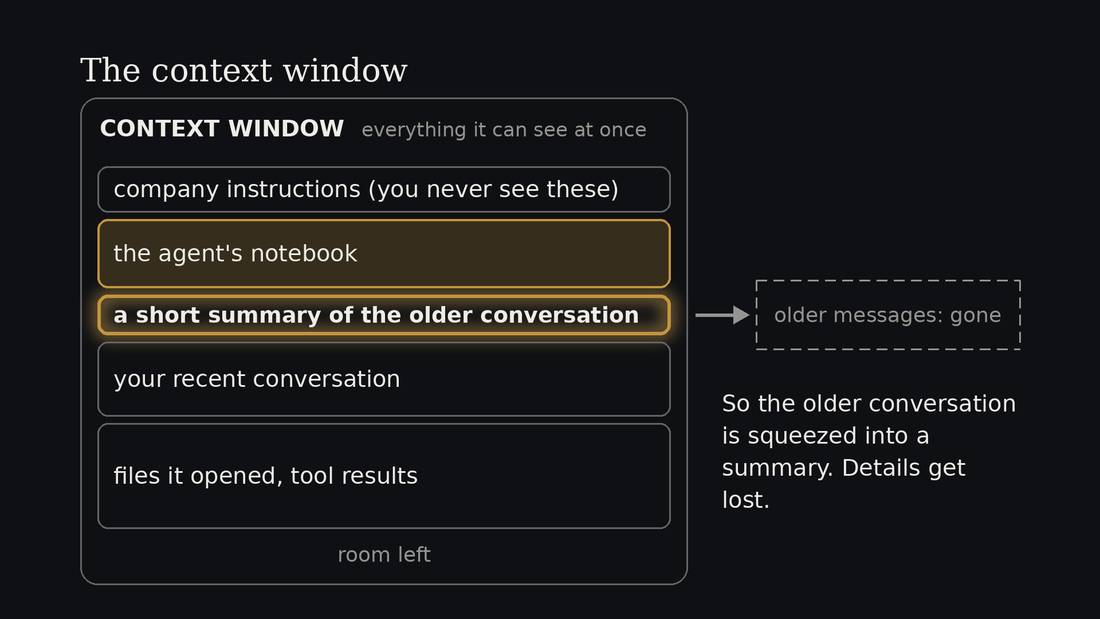
Everything the model can see at once is called its context window. Think of it as one page. It's the model's short-term memory. The page holds the company's instructions, the agent's notebook, your conversation, and every file it opens.
The page has a size limit. So the notebook competes for space with your conversation. A long notebook leaves less room to work.
When the page fills up, the older conversation is squeezed into a short summary, called compaction, and details get lost. That's why a long chat starts to forget things, and why it helps to start a new chat for a new job.
3. The loop
Reading what the AI wrote is not enough
- AI writes, you read: the weakest way to learn
- AI highlights what is new/conflicting, you talk it through
- Then test yourself, practise, and find people
I think notes that the AI writes and you read are close to rereading, and rereading is one of the weakest ways to learn.1 What an AI can do that a book cannot is read the sources, know your goal, ask what you already know, and show you the parts you do not know yet, or that contradict what you do know. Then you talk those parts over with it, one question at a time, and your questions and answers go back into your notes.
The talking and interaction is the learning, and the notes are what make it possible. You also need to quiz yourself later, to practise the real thing, and to find your community.
Sources: 1
The loop
This is the loop we will follow:
- Research
- Talk it through
- Remember
- Practise
- Find your people
First, the AI researches your hobby and writes the wiki. A wiki is a folder of short pages that link to each other, like Wikipedia, but about your hobby and just for you. The AI does the research with web search: it looks things up on the internet and writes down the web address, the URL, where it found each thing.2 It also keeps a short list of places to learn it: videos, courses, library books, online groups and clubs. You still need to learn from other people and other sources, and the AI is good at finding them.
This wiki is what allows your agent to be an expert that can teach you. Remember the context window: a long chat fills up and starts to forget. So start a new chat for each job: each bit of research, each talk, each quiz. The wiki is what carries over from one chat to the next.
The first thing you want to have it research are the basics, the beginner-friendly parts and how to best teach them. Then it can start teaching you.
Once you've started your wiki and your learning, you keep adding to it: when you or your agent discover new resources, blog posts, videos, whatever it is, you ask it to add those to the wiki.
You can read or watch those too, but I find that it's useful to just do a quick check if it seems interesting and relevant and then immediately have your agent check it out. It can let you know if there is anything you should check out, or talk you through the parts you do not know yet.
Third, you quiz yourself after a gap.
Fourth, you practise the real thing.
Fifth, and for most people the most important, you find other people doing the same thing. The AI can teach you and it can point you at a community. The point of an AI tutor isn't to avoid people, and for most of us, learning as part of community is meaningful and rewarding.
Sources: 2
4. Build your wiki
Stuck? Ask the agent
I don't understand what just happened. Explain it simply.
That didn't work. What should I check?
What should I do next?
With most software, when it does something you don't understand, you're stuck. You search for the answer, you guess, or you give up. An agent is different, because you can just ask it. It can see what it did and what went wrong, and it can tell you in plain words.
So tonight, if the screen shows something strange, or the agent stops, or it asks you a question you don't follow, ask it. Type what you would say to a person. You don't need the right words, and you can ask again as many times as you like.
It can be wrong, so if the answer matters, check it. But asking is almost always faster than being stuck.
Start your wiki
start wiki
- It asks what you love. Answer in a few words.
- Then a few quick questions about what you already know. "New" and "idk" are fine.
- Tell it only what you would tell a stranger
- Your notebook opens in the browser
- Is what it says about you right? Nothing private?
Type "start wiki". The agent asks what you love or want to learn. Then it asks a few quick questions about what you already know. It cannot see inside your head, so this is how it finds out. If you are new, it gives you a short list of words: new, heard it, or I can say what it means. "New" is a fine answer, and so is "I don't know". Remember: nothing too personal. Then your notebook opens in the browser. It is nearly empty for now: just what you told it about you. Read it. Is it right? Is there anything there you would not tell a stranger at a club? If so, ask the AI to change it or take it out.
Research
research
- First a draft from what it knows: yellow = not checked
- Then it checks on the web: yellow turns into links
- Lists resources: online, the library, people
- At the end: "what you may not know yet"
- Refresh the page: Command-R on a Mac. Closed tab? Type
show - Click one source. Does the page say what the wiki says?
Type "research". It works in passes. First it writes a draft from what it already knows, and every line is marked yellow: not checked yet. Refresh your notebook page to see it: Command and R on a Mac, Control and R on other computers. Then it searches the web, and where a page agrees, the yellow turns into a source link. Where a page disagrees, it fixes the line. When it is done, refresh it again. If you lost it, type "show". Skim it. You do not need to study it: the learning comes next, when you talk it through.
Each fact has a small "source" link. Click one. Does the page say what your wiki says? The wiki is a draft written by an AI that has only read web pages, and it can be wrong. Some people who ran wikis like this for months found that one wrong note got copied into others.3 The link is how you catch it.
Sources: 3
Is it safe?
There are many risks, but usually people are worried about privacy. Consumer accounts default to sharing data for training purposes, but some companies allow you to toggle that off.
You should always minimize what you reveal. Share the problem, not the private details. Almost every real problem has a version that carries none of your private information. Many things are low stakes, especially once personal info is removed.
Many of the US AI companies are the same Internet companies that already have a great deal of information about you, and if you browse the web without ad blockers then using AI may not increase your risk. People should be careful with what they share on social media and use ad blockers, and they should be just as careful with their AI interactions.
Who gets your chats?
- Free and personal accounts: chats used for model training
- sometimes can be switch off
- Business/school can have more privacy
- May not increase your risk depending on current Internet use
The privacy policies are more alike than different. On a free or personal account, the company may read your conversations and use them to train its next model, and some of them keep your chats for years. Most of them let you turn training off, and each hides the switch somewhere different. Sometimes for legal or security reasons that need to retain your data, and usually even if they don't train on it they keep it around. Business and school accounts usually come with stronger privacy, written into a contract, and that protection is mostly not on offer to individuals. So the advice holds for all of them: leave out the private details.
One thing to note: if you use social media or browses the web without an ad blocker, your risk profile is not going to change much by using AI, unless they give the company more data than it already has. If you give Meta's AI access to your Gmail, now two companies have your email.
Should I let AI into my documents?
- Not yet, in my own practice
- A connection to your Google Docs is a yes you say once
- Work in plain text files on your own computer
- Ask AI to make doc / PDF
Most chat tools can connect to your Google Docs if you say yes. In general I think that is a bad idea for now, but it is frustrating if you are writing an essay and going back and forth. My practice is to not let the AI into my Google Docs yet. I work in plain text files on my own computer and let the AI read those. AI likes simple text files in a format called Markdown with a .md extension. When the writing is done, I ask it create an html file, a doc or a PDF. I can upload that for sharing.
Keep it general
- No name, address, school or job
- "Weekday evenings, 20 minutes", not your calendar
- A local landmark, library, not your street
- "I'm a beginner", not your health or money
- Nobody else's details
- Typed too much? Ask it to take it out of your notes
The AI does not need your details to help you. A general answer works just as well. When it asks when you are free, say "weekday evenings, about 20 minutes", not your calendar. When it asks where, give a library branch, not your street. If something makes learning harder for you, say "I get tired by evening" or "I'm on a tight budget", not your health or your bank balance. And leave other people out: no names, no family details.
If you typed too much, ask it to take that out of your notes. That cleans up your notes, but the company already has what you typed. So the habit is to give the general answer the first time.
Talk it through
talk
- It picks one thing you may not know yet
- One short question at a time. Answer in your own words.
- Your answers become notes in your wiki
- Wrong answers are fine. It tells you why.
- Ask it: "What did I get wrong?"
- Done early? Ask your own question and watch the wiki grow.
Type "talk". The agent cannot see inside your head. It builds your list of "what you may not know yet" from what you told it at the start, and what the pages say that you did not mention. The list is a guess, so say so if it is wrong. The agent takes one thing from it and asks you a short question about it. Answer in your own words. Short answers are fine.
You will probably guess wrong at some point, and that is the useful part. Ask it, "What did I get wrong?" An assistant likes to agree with you, because assistants are trained on what people approve of.4 So the second question tells you more than "Did I get it?".
Sources: 4
Check
check
- It looks for claims with no link, and pages you never talked about
- Open one flagged link
Type "check". The agent looks over your wiki for claims with no link and pages you never talked about. Open one link it flags, or one it did not flag, and compare.
5. Remember and practise
Two kinds of learning
- Memorize: words, jargon, facts. Test yourself. Come back tomorrow.
- Practise: conversation, cooking, drawing, problems. Do it. Get a small hint. Do it again.
There are two kinds of learning, and they need different help. The first is memorizing: the words of a new language, the jargon of a hobby, facts and techniques. The second is practising: talking with someone, cooking a recipe, drawing, solving problems with a coach.
Most hobbies need both. A knitter memorizes the names of stitches and practises the stitches. Learning mostly comes from the second, but can be gated by the first. Before you can do conversation practice you need to learn some words.
Two habits that help learning stick
- Test yourself. Do not just reread.
- Come back to it: tomorrow, next week
- Both feel harder. Rereading feels easy.
Two habits have the best evidence for making learning stick. The first is to test yourself. In one experiment, students learned a list of words. Some kept quizzing themselves on the words. Others stopped once they got a word right. A week later, the ones who kept testing remembered about 80 percent, and the others about a third. Before the test, every group guessed they would remember about half.5
The second is to come back to it over days, not in one long night. A big review of study methods rated testing yourself and spreading your practice out as the best of the ones it checked, and rereading and highlighting as the weakest.1
Your turn: pick one
quiz
practise
- `quiz` for words, jargon, facts: answer before it shows the answer
- `practise` for conversation, cooking, drawing, drills: a small hint only when you are stuck
- Both can use a place from your "where to learn it" list. You choose which.
- Done early? Do the other one.
You have a wiki, and you talked part of it through. Here are the two kinds of learning as two short prompts. For words, jargon and facts, you use quiz. The agent asks a question and waits. You answer first, and say how sure you are, then it shows the answer. That is testing yourself, and it comes from your wiki. It starts with what you talked through. Some cards will be on pages you have not read yet. Guess anyway: a wrong guess before you see the answer still helps you remember it.6 For conversation, cooking, drawing and drills, you use practise. The agent acts as a partner or a coach. It gives you something to do, and when you are stuck, it gives one small hint at a time, never the whole answer.
Pick the one that fits what you are learning, and type it.
Sources: 6
6. Find your people
- AI can teach you. People are who you stay with.
- The agent can help you find a group, a class or an event
- And help you write the first message, or pick a first visit
I think the most important part of learning something you love is other people doing the same thing. A group gives you someone who notices when you stop, someone who can watch your hands, and someone to show your work to. An AI can teach you, and it can help you find a group, write the first message and pick a first visit. It can be hard to get out the door sometimes, and your agent can make that easier. People are who you stay with.
Togather: events for agents
- Open. Free. No account. No UI.
- Mostly library, local community and arts events
The agent finds local things in a list called Togather. It is a free list of events and groups in Toronto that is designed for your agents to read and then suggest events for you to go to. My agent checks it every day and sends me a newsletter. I built and run the Toronto list. Right now it has library, community and arts events, but it is weak for sports, big events, things on instragram, and other events that can afford to advertise.7
Sources: 7
Find your people
local
- Tell it your hobby word, and a library branch
- Searches Togather list (Toronto) then the web
Type "local". Give it one word for your hobby and the name of a library branch that is easy for you to reach. Not your address. It searches the list. If the list has nothing, or does not answer, it searches the web and tells you which results came from where. If that finds nothing too, it says so, and suggests where else to ask, like the programs desk or a community centre. The Togather list only covers Toronto, but its open source and anyone can run their own version for their city.
7. A week that survives a bad day
- A normal day: 20 minutes of one thing
- A bad day: 2 minutes, the smallest version
- One day off, on purpose, and one day with people
- Pick a sign today: what will tell you it is working?
- Day seven: did the sign show up? Keep, change or stop
A plan that only works on a good day will break on the first bad one. So we make the bad day part of the plan. Each day has a normal version, about 20 minutes, and a bad-day version that takes two minutes. For an interest in sourdough, the bad-day version might be: feed the starter, or read one card. Doing the small version counts. Add one day off, on purpose, and strive for one day with people.
You also need to create signposts that you are making progress. The simpler and easier the better. Pick one sign today, while you feel fine, that will tell you your learning is working: a sourdough loaf with some holes, a sentence in French said to a collegue. Each week, pick a sign, and keep the plan, make it smaller or different, or stop. Stopping is allowed. If you find out you do not love what you're learning, you learned that you need to move on and find something else. I do a weekly review like this myself, and there is a whole workshop on it, Get Things Done with AI.
Your week
plan
- Seven days, one small thing a day
- A bad-day version
- A stop-or-revise line, with a date
- Include community events
- Ask it: "Is this too much?"
Type "plan". It writes a seven-day plan from your wiki and your hobby. It puts it on your notebook page as a table: refresh it and click "My plan". Read it. Does each day have a small version? Is there a day with people, and a line that says when you will stop or change? Then ask it, "Is this too much?" Most of us plan too much.
8. Tools to try at home, and avoiding dependency
Prefer open tools
- Open: the code or the writing is public, and anyone may use and change it
- You can read it and check it
- Your agent can read it, run it, and change it to fit you
- Free is not the same as open
When your agent lists places to learn from, tell it to rank the open-source ones first. Open means the code, or the writing, is public, and the licence lets anyone use it and change it.
With an open tool, your agent can read how it works and check it. It can run it, fix it, and change it to fit what you need, which it cannot do with a closed app. Free is not the same as open: a free app can still be closed, and it can change or disappear. We are in the midst of a software revolution because agents can write any software you need, but you may just need to customize something that mostly exists already.
LearnHarness
- A free open source app that connects to your AI
- Measures what you know, teaches one step, then practises
- What you type goes to company
- Nobody has tested whether it works
One you could use at home is LearnHarness. It is a free app, with its code open for anyone to read, that does the same job we did today in one place. It first asks questions to find where your knowledge ends. Then it plans a path and teaches one step at a time, with a check each time, and then it gives you practice, with the smallest hint first.8
You connect it to an AI account of your own, so the app is free and the AI behind it may not be, and what you type goes to that company. This is an example of one person's idea of a customized learning tool. Nobody has tested whether it works, but the point is that anyone can build their own system now.
Sources: 8
Anki, and a language plug-in
- Anki: free flashcards that bring each card back just before you forget. Open source.
- Android: free. iPhone: a paid app.
- fluent: a free add-on for Claude Code that teaches a language and tracks the words
If you want the remembering part done for you, there is Anki. It is a free, open-source flashcard program that uses spaced repetition, which means it shows each card again after a gap that gets longer every time you get it right. The Android app is free and the iPhone app is paid.9 We did the same thing by hand today with the quiz and you can have the agent create your own spaced repetition app, or cards for Anki.
For languages there is fluent, a free add-on for Claude Code that teaches a language and keeps track of the words. You need Claude Code on your own computer, and one command in a terminal to set it up.10
Ask it to teach you
I have this problem... is there anything you could help with?
Explain what you just did, step by step, in plain words.
How did you get to that answer?
The best way to keep learning after today is to ask the AI itself. It will explain things as many times as you want, without getting tired of you.
Tell it about the problem you're trying to solve and ask what it could help with. When it does something, ask it to explain what it did, step by step, in plain words. And ask it how it came to its answers, and it can lead you through its reasoning.
One warning. It can be wrong about itself too. And it hasn't seen the latest things people can do with AI unless it does a web search.
Avoid dependency
- Set your goals
- Make decisions
- Do the hard thing(s)
The point of learning something new is to enter into that place where you feel stupid, confused, and overwhelmed. It always starts like that and a good teacher is one who guides you through that awkward phase and leaves you independent of their help. The AI doesn't know it should be a good teacher until you tell it to be, and you help it by acting as a good student or apprentice. Unlike a human teacher, it has no will of its own, and you can make it into something unhelpful.
9. Take it home
What opens at home
- Open
wiki.html: your notebook in any browser - The notes are plain text files. Any text editor opens them.
- Or ask any AI to read the folder
- Your own words are in there: your answers and your plan
- Keep going: do the plan, come back to the quiz tomorrow
At home, double-click wiki.html and your notebook opens in the browser, links and all. Underneath, it is a folder of plain text files, so any text editor opens them. Or ask an AI to read the folder, and keep going. Come back to the quiz tomorrow, then in three days, then in a week.
10. Backup · Questions people might ask
Sources
- Dunlosky, Rawson, Marsh, Nathan & Willingham (2013). "Improving students' learning with effective learning techniques." Psychological Science in the Public Interest 14(1).
- Karpathy, A. "LLM wiki" (gist), https://gist.github.com/karpathy/442a6bf555914893e9891c11519de94f.
- Anecdote and opinion, not a study: "I read all 1,061 comments on Karpathy's LLM wiki gist" (omiid.me); a Zettelkasten user's review (yu-wenhao.com); a critique at gnu.support. No controlled study of errors in AI-kept wikis was found.
- Sharma, M. et al. (2023). "Towards Understanding Sycophancy in Language Models." Anthropic.
- Karpicke, J. & Roediger, H. (2008). "The critical importance of retrieval for learning." Science 319(5865).
- Kornell, N., Hays, M. J. & Bjork, R. A. (2009). "Unsuccessful retrieval attempts enhance subsequent learning." Journal of Experimental Psychology: Learning, Memory, and Cognition 35(4), 989-998. Richland, L. E., Kornell, N. & Kao, L. S. (2009). "The pretesting effect: Do unsuccessful retrieval attempts enhance learning?" Journal of Experimental Psychology: Applied 15(3), 243-257.
- Togather, the Toronto events list, https://togather.foundation.
- LearnHarness, https://learnharness.ai (open source, AGPL-3.0), https://github.com/amosblomqvist/learnharness.
- Anki, https://apps.ankiweb.net.
- fluent, https://github.com/m98/fluent (MIT).
- No study found: a search for this workshop (November 2026) found no study of chatbots coaching physical technique, only news reports.